




Fakeiman
-
Joined
-
Last visited
Posts posted by Fakeiman
-
-
11 hours ago, jabelar said:
It is definitely difficult when a problem only happens occasionally to debug what is happening because it can take a while to even confirm that a suspicious mod is indeed the problem.
However, it is mostly likely an interaction between your mods. Meaning it is some combination that isn't working. And that is hard to isolate when you have so many mods. You might start by figuring out which mods affect rendering so much, since not all mods do. If that list is somewhat short you can experiment with combinations of them.
Also, is there any errors in your logs? Usually when things start to go poorly a mod will spit out an error. Like missing texture or missing model or something.
39 minutes ago, Cadiboo said:Looks like a bad shader, direct OpenGL access, a coremod or an extra popMatrix() somewhere. Or any combination of them. As @jabelar said, go through your logs
I really, really appreciate the help and suggestions guys. I will start working on that soon. I can post a couple logs too if that would help you help me. Thanks again guys.
-
On 8/3/2018 at 11:38 AM, jabelar said:
If you're lucky someone might have seen this before and know the answer. Otherwise you'll have to figure it out the old-fashioned way. You have to remove mods until the problem goes away to try to isolate the mod(s) that are causing it.
You have a heck of a lot of mods, so that will take some work. I would start with a "binary search". I mean I would get rid of half the mods and see if the problem still occurs. If not try the other half and confirm it still occurs. Then take the half that has the problem and cut that in half and try both halves. You keep doing that until you get down to the specific mod. This is a fast approach because even though you have 253 mods, you only have to cut it in half 8 times (groups of 128, 64, 32, 16, 8, 4, 2, then 1)
Now it is very possible that the problem is due to an interaction between two mods. For example you could cut the mod pack in half and find that neither half shows the problem. In that case you're going to have to crawl through one by one until you find one that is involved and then crawl through the rest to figure out which one is interacting poorly.
This forum may not be the best place to ask. This is for people who write mods. Other forums for making mod packs are more likely to find someone who has seen this before.
All the mods work... for some reason out of nowhere it starts up randomly. i played a world for a few hours, logged in and out maybe 3 times, then on the third time loading it up the textures are fucked. This sucks.
-
1 hour ago, jabelar said:
If you're lucky someone might have seen this before and know the answer. Otherwise you'll have to figure it out the old-fashioned way. You have to remove mods until the problem goes away to try to isolate the mod(s) that are causing it.
You have a heck of a lot of mods, so that will take some work. I would start with a "binary search". I mean I would get rid of half the mods and see if the problem still occurs. If not try the other half and confirm it still occurs. Then take the half that has the problem and cut that in half and try both halves. You keep doing that until you get down to the specific mod. This is a fast approach because even though you have 253 mods, you only have to cut it in half 8 times (groups of 128, 64, 32, 16, 8, 4, 2, then 1)
Now it is very possible that the problem is due to an interaction between two mods. For example you could cut the mod pack in half and find that neither half shows the problem. In that case you're going to have to crawl through one by one until you find one that is involved and then crawl through the rest to figure out which one is interacting poorly.
This forum may not be the best place to ask. This is for people who write mods. Other forums for making mod packs are more likely to find someone who has seen this before.
Thanks for the suggestion, i was considering that but my preferred option would be someone who may know exactly what it is before i have to resort to that. I didnt know where else to go for this sort of thing. Could you suggest a forum i could use? Thanks!
-
Posted ·
Edited by Fakeiman
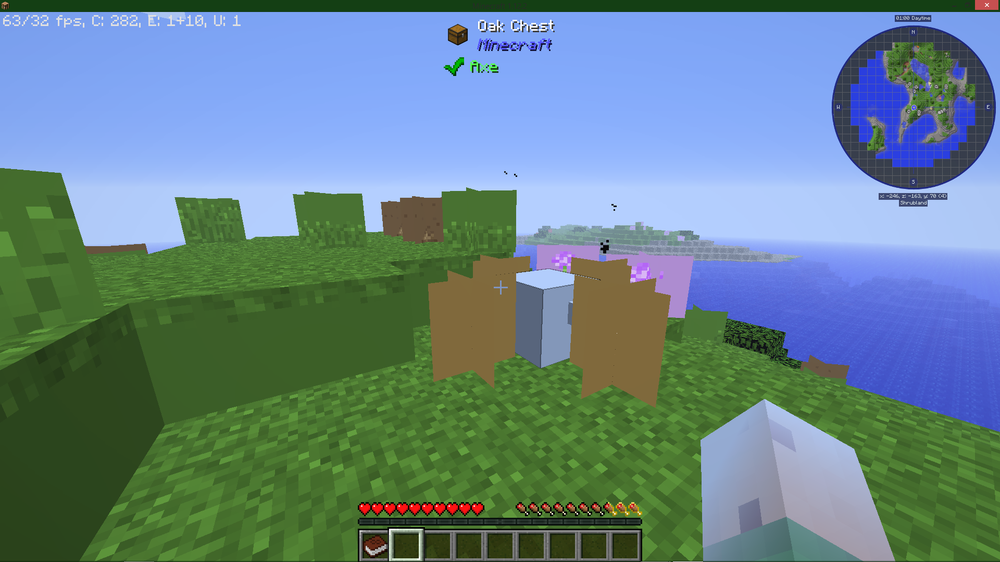
added files and infolatest.logI've been adding mods to FTB Revelation v2.0.3, now that the mods are working, I have encountered a very strange visual glitch... I've messed around with Optifine's settings, I've dug through BetterFPS's settings... No clue about what is going on. The ONLY problem with my little pack and how it runs is this visual glitch which makes it pretty much unplayable.
If anyone has any suggestions or advice on it, I would be grateful.
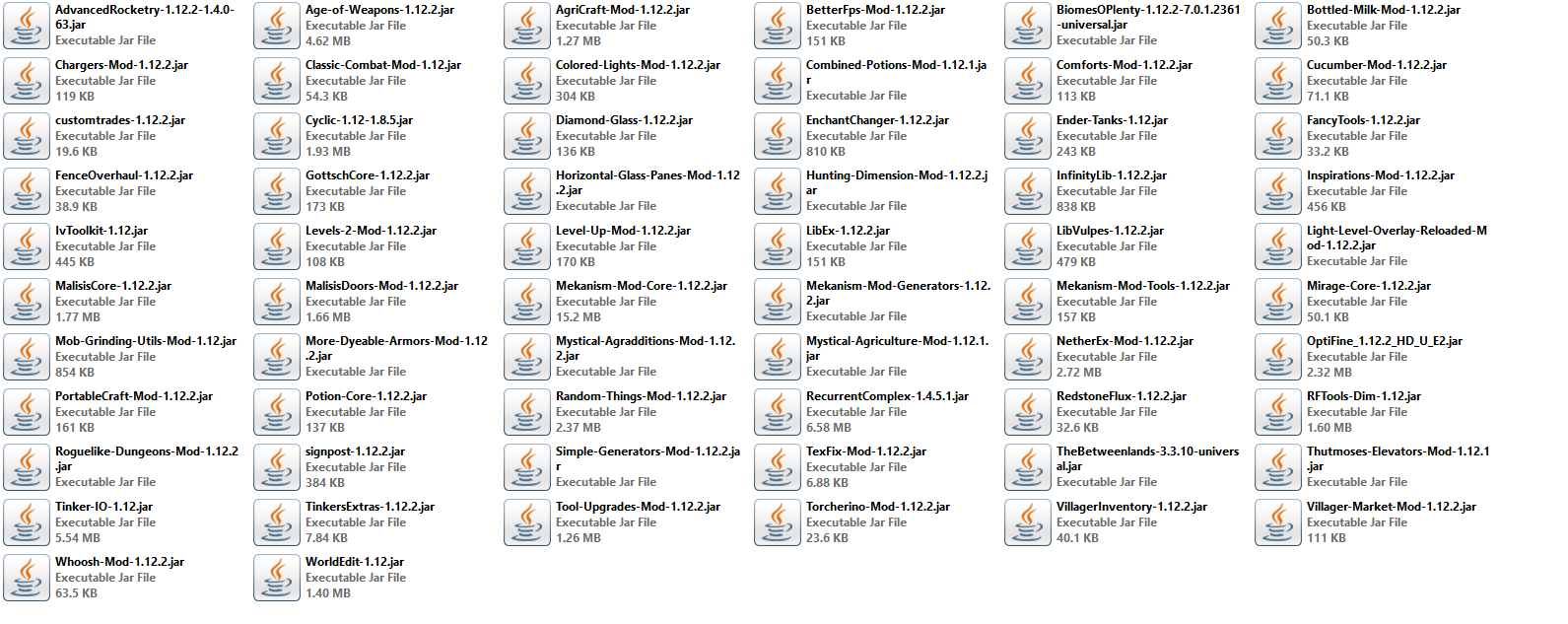
--I attached both a full mod list and a picture of the specific visual glitch.
-Computer Specs: 16gb RAM (4 Allocated, doesn't really need more) --- CPU i5-4440 @3.1GHz --- GPU NVIDIA GTX 970
(Additional Java Parameters: -Xincgc -XX:ParallelGCThreads=4) Can't remember how long I've had this and I don't know what it does besides letting me use my CPU better, but it seems to help with performance or it used to.
-
1 hour ago, Animefan8888 said:
Remove all of the mods you got from 9minecraft.
Thank you. I deleted the modpack and reinstalled it, then redownloaded all the mods using only curseforge. There were a couple mods i couldnt find (probably for a reason) so they arent in my collection anymore, but pretty much all of them are still there. It mustve been some sort of fuckery from 9minecraft. I got stuff from there to work in the past, but im just gonna stay clear from there from now on. You have my gratitude.
-
Edited by Fakeiman
extra info8 minutes ago, Animefan8888 said:I can't find anything that would cause this error at first glance. What mods did you add, and where did you download them, including forge.
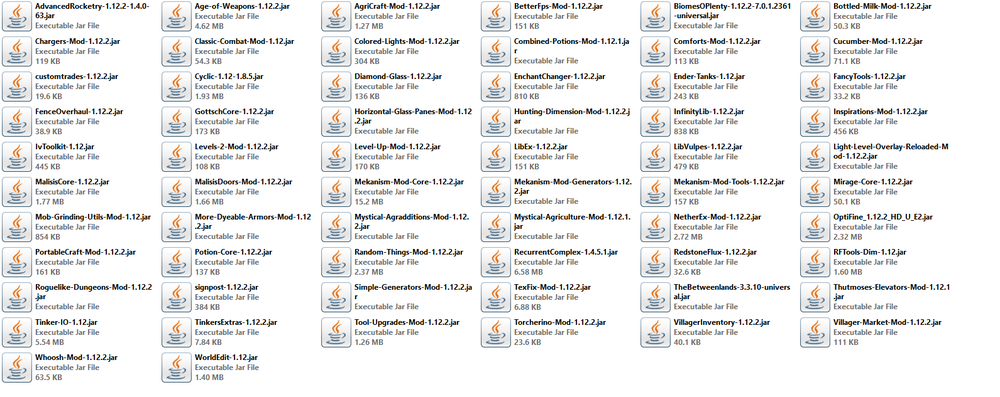
I got mods from curseforge, forge from curseforge, a few mods from 9minecraft (replaced a few because they caused issues, replaced with curseforge mods). I will attach a picture to this of all the new mods (easier than listing them out, all their versions should be visible)
edit: All other mods are all included in the FTB Revelation pack. I didnt remove any of those. its v2.3.0 of the pack as well if thats important.
-
-
-
Posted ·
Edited by Fakeiman
Added additional filesProblem
I've been trouble shooting the mods ive added to the FTB Revelation pack, they all load up, they all have the necessary libraries, but now the only problem i can see is with Forge. I've tried a couple different versions. No change.
-----
I attached the latest crash report. If someone can help me I would be very grateful, if theres any other files or information you need about what im doing, let me know.
-This is the first time the game has actually pretty much loaded all the way up since i started messing around with the mods. In the crash report, "UCHIJAE | forge" is the only problem. (Those letters stand for parts of loading, forge is the only one in the whole file to have the E for error. Everything else is just UCHIJA)
Thanks for the help ahead of time.
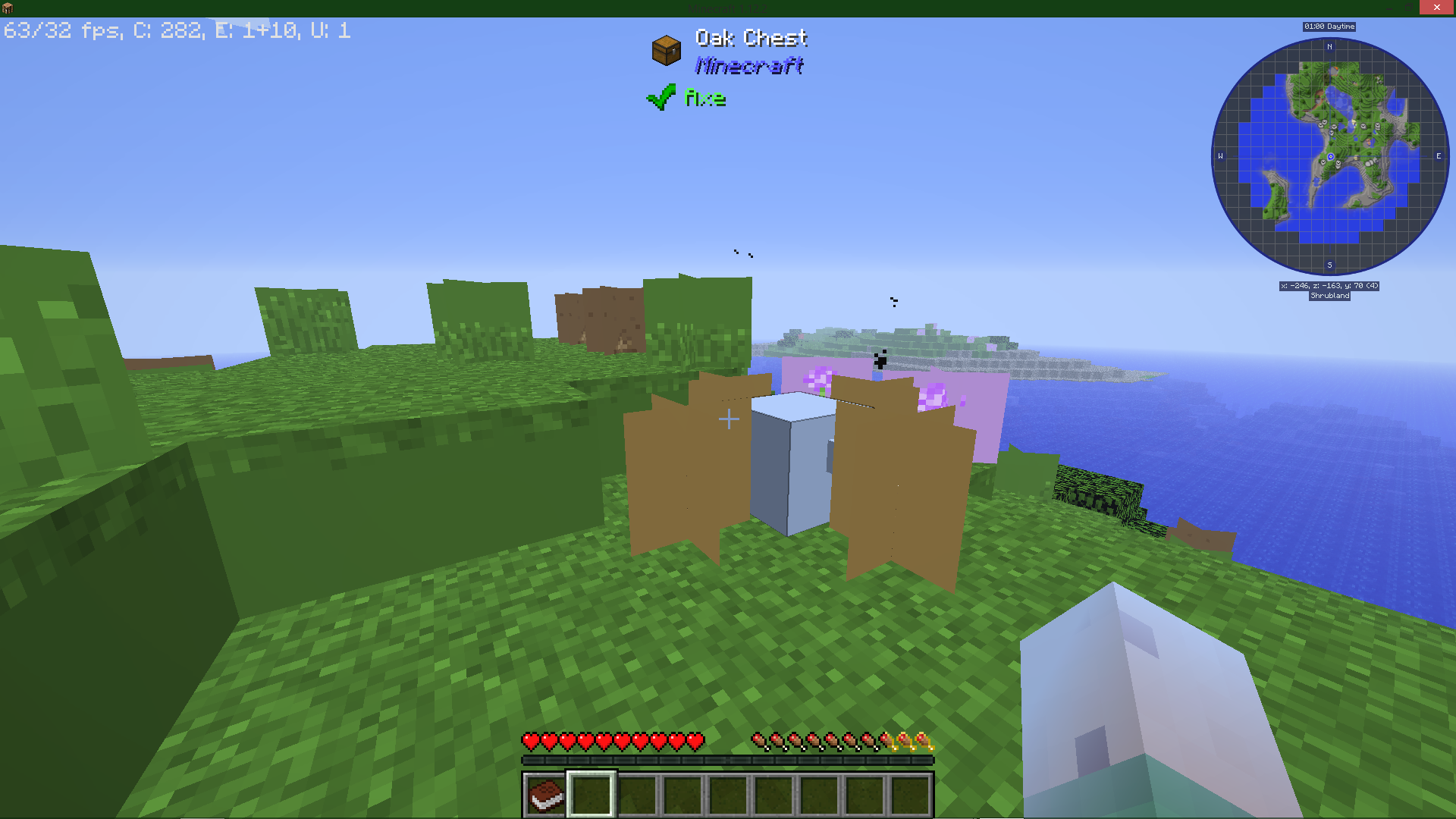
Weird visual error. Can't figure out cause. Help?
in Modder Support
The list has been there since i made the original post, the debug.log and latest.log are both there now (would only allow me to upload them compressed) my important computer specs are there now, and I wasn't sure what I'm supposed to put for Java Runtime Arguments, but I did have some additional parameters inside the FTB launcher that assist with performance that I figured I should put down.
IMPORTANT: I used my best judgement to pick out two mods that could cause problems before taking a binary troubleshooting approach. I was looking at the lighting overlay mod and BetterFPS. It seems that BetterFPS was the culprit, and removing it has fixed the errors... so far. Im not sure why its the problem, and Im kind of bummed since my fps will suffer slightly now. Thanks for the help, maybe if at all possible it could just be something wrong with that version of the mod and if i try a different version it could work but im not sure.