




mostafa mohy
-
Joined
-
Last visited
Posts posted by mostafa mohy
-
-
hi being from a 3rd world country buying minecraft is hard now maybe after two monthes i will be able to, so i want to create a mod for minecraft but i got problems in it ,does it relate to me using tlauncher or not thnx in advance.
-
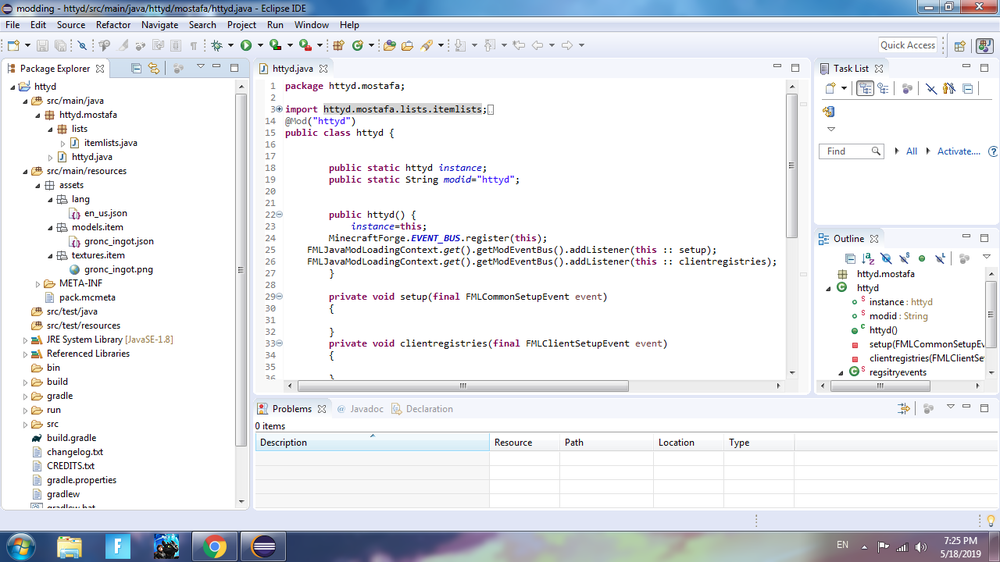
hi i am new to minecraft modding and java programming but i have experience in c# and c++< so i tired to make a new ingot for my httyd mod but it textures and name doesnt show, btw i am following harry talks tutorials for forge 1.13 i will post screen shots for my code and workspace
package httyd.mostafa;
import httyd.mostafa.lists.itemlists;
import net.minecraft.item.Item;
import net.minecraft.item.ItemGroup;
import net.minecraft.util.ResourceLocation;
import net.minecraftforge.common.MinecraftForge;
import net.minecraftforge.event.RegistryEvent;
import net.minecraftforge.eventbus.api.SubscribeEvent;
import net.minecraftforge.fml.common.Mod;
import net.minecraftforge.fml.event.lifecycle.FMLClientSetupEvent;
import net.minecraftforge.fml.event.lifecycle.FMLCommonSetupEvent;
import net.minecraftforge.fml.javafmlmod.FMLJavaModLoadingContext;
@Mod("httyd")
public class httyd {
public static httyd instance;
public static String modid="httyd";
public httyd() {
instance=this;
MinecraftForge.EVENT_BUS.register(this);
FMLJavaModLoadingContext.get().getModEventBus().addListener(this :: setup);
FMLJavaModLoadingContext.get().getModEventBus().addListener(this :: clientregistries);
}private void setup(final FMLCommonSetupEvent event)
{
}
private void clientregistries(final FMLClientSetupEvent event)
{
}
@Mod.EventBusSubscriber(bus=Mod.EventBusSubscriber.Bus.MOD)
public static class regsitryevents
{ @SubscribeEvent
public static void registeritems(final RegistryEvent.Register<Item>event )
{ event.getRegistry().registerAll(
itemlists.gronc_ingot = new Item(new Item.Properties().group(ItemGroup.MISC)).setRegistryName(location("gronc_ingot"))
);
}
}
public static ResourceLocation location(String name)
{
return new ResourceLocation(modid, name);
}
}

forge 1.13.2 problem with item textures and name
in Modder Support