




Yanny7
-
Joined
-
Last visited
Posts posted by Yanny7
-
-
-
Clean build of forge (#94389d0e) is crashing when trying to run
forge forge client
[14:09:38] [Render thread/INFO]: Setting user: Dev
[14:09:38] [Render thread/INFO]: Backend library: LWJGL version 3.2.2 SNAPSHOT
#
# A fatal error has been detected by the Java Runtime Environment:
#
#  SIGSEGV (0xb) at pc=0x00007fcbd89b1112, pid=47207, tid=47208
#
# JRE version: OpenJDK Runtime Environment (16.0.2+7) (build 16.0.2+7)
# Java VM: OpenJDK 64-Bit Server VM (16.0.2+7, mixed mode, tiered, compressed oops, compressed class ptrs, g1 gc, linux-amd64)
# Problematic frame:
# C  [libglfw.so+0x17112]
#
- tried on Arch linux
- Note that I havent problem running it on 1.15.x and 1.16x
- debug.log failed to upload
-
problem is running gradle daemon, just disable it - search in intellij "show gradle daemons" and kill them all
-
 1
1
-
-
-
-
Posted ·
Edited by Yanny7
How can I remove block from generation process? I need to disable all generated crafting tables. Any ideas?
-
Writing mod is most likely reverse-engineering, but there are few good tutorials on youtube for basics.
-
 1
1
-
-
Edited by Yanny7
Sorry, I fixed grammar in file meanwhile, here is it now https://github.com/yanny7/StoneAge/blob/master/src/main/java/com/yanny/age/stone/client/renderer/AqueductRenderer.java
edit:
permanent link: https://github.com/yanny7/StoneAge/blob/af01a15a6bfcb313c02faad97c47bb4e6bf63d72/src/main/java/com/yanny/age/stone/blocks/AqueductBlock.java
-
-
1 hour ago, devguydan said:
No, I don’t think it looks bad at all. It looks proper, if you mean that the base block of your chimney has a shadow. It would, if the flame light is coming from the furnace that is over an edge, the light would cast a shadow at the very base. Is this what you are referring to as “looks horrible”?
Yes, the furnace is too bright, but chimney base is too dark. I know that this can be as light behind edge but still, whole block is bright. But maybe this is default vanilla behavior.
-
Edited by Yanny7
Check DefaultBiomeFeatures class for flower generation in biome. Then just in code below add your new entry for your flower (you should add some check to just insert flower for specific biomes)
@SubscribeEvent public static void FMLLoadCompleteEvent(FMLLoadCompleteEvent event) { for (Biome biome : ForgeRegistries.BIOMES) { // add there } }-
1
-
-
I think that this will be hard part. Vanilla minecraft does not have implemented this behavior. You have to do it all by yourself.
Easiest approach will be to have configuration where you set alignment, size etc..
Harder approach is to do it responsible by implementing drag&drop features and moving widgets by mouse like in Draconic Evolution mod. But this require A LOT of coding.
If you are beginner in modding and coding, just stay with plain config file, or simple configuration page with edit boxes.
-
-
Based on
and https://github.com/MinecraftForge/MinecraftForge/issues/5560
seems that modders should not modify block haverst level of other mods.
BUT
In my mod https://github.com/yanny7/StoneAge I have to adjust harvest level of vanilla blocks. Does someone have good idea how to implement this and does not break other mods?
another thing is that I cannot use setBlockToolSetter because it is static and now I am working on sequel to first mod where I need also adjust harvest levels ... I used reflections to modify them, but I dont like this approach. Is there better way how to do this?
-
-
-
Hi, when I render transparent block on this lit furnace, it renders darker from side of furnace. But it looks horrible. It is possible to somehow get rid of this?
Example:
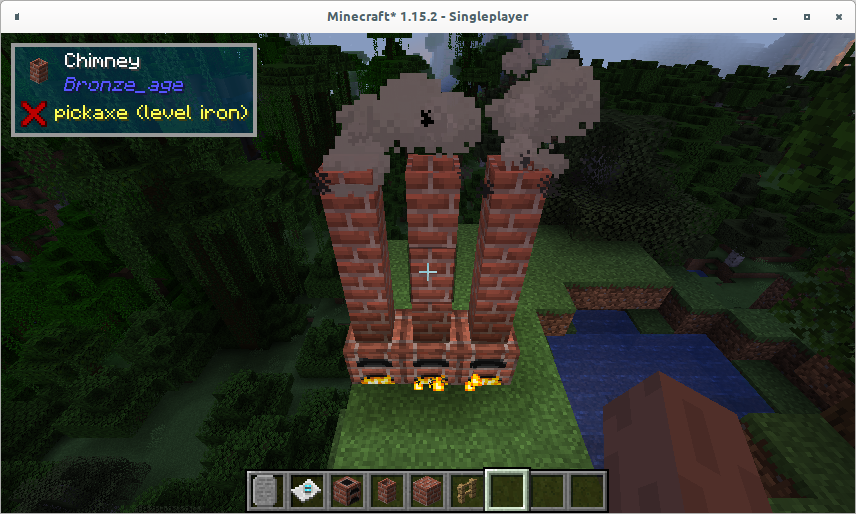
Block:
public class ChimneyBlock extends Block {
    protected static final VoxelShape SHAPE = Block.makeCuboidShape(3.0D, 0.0D, 3.0D, 13.0D, 16.0D, 13.0D);

    public ChimneyBlock(Properties properties) {
        super(properties);
    }

    @SuppressWarnings("deprecation")
    @Override
    public boolean isTransparent(BlockState state) {
        return true;
    }

    @SuppressWarnings("deprecation")
    @Override
    @Nonnull
    public VoxelShape getShape(BlockState state, IBlockReader worldIn, BlockPos pos, ISelectionContext context) {
        return SHAPE;
    }
}
Register:
Block.Properties chimneyProperties = Block.Properties.create(Material.ROCK).harvestLevel(ItemTier.STONE.getHarvestLevel()).harvestTool(ToolType.PICKAXE).
        hardnessAndResistance(2, 2).variableOpacity();
registry.register(new ChimneyBlock(chimneyProperties).setRegistryName(MODID, "chimney"));
-
You can check vannila crafting table, or I created custom crafting table in my mod https://github.com/yanny7/StoneAge/blob/1.15/src/main/java/com/yanny/age/stone/recipes/FlintWorkbenchRecipeSerializer.java just clone mod and try to look into code how it works
-
1
-
-
Posted ·
Edited by Yanny7
Hi I have problem with rendering transparent texture - I am using water texture, but it renders almost black. Any ideas how to do it right?
matrixStack.push();

RenderSystem.enableBlend();
RenderSystem.color4f(1.0F, 1.0F, 1.0F, 1.0f);
RenderSystem.defaultBlendFunc();
RenderSystem.disableTexture();

IVertexBuilder vertexBuilder = renderTypeBuffer.getBuffer(RenderType.entityTranslucentCull(WATER));
MatrixStack.Entry matrix = matrixStack.getLast();
Matrix4f matrix4f = matrix.getPositionMatrix();
Matrix3f matrix3f = matrix.getNormalMatrix();

func_229132_a_(tileEntityIn, vertexBuilder, matrix4f, matrix3f, 0, v, 1, 0, off + 1/32f, overlayUV, lightmapUV);
func_229132_a_(tileEntityIn, vertexBuilder, matrix4f, matrix3f, 1, v, 1, 1, off + 1/32f, overlayUV, lightmapUV);
func_229132_a_(tileEntityIn, vertexBuilder, matrix4f, matrix3f, 1, v, 0, 1, off, overlayUV, lightmapUV);
func_229132_a_(tileEntityIn, vertexBuilder, matrix4f, matrix3f, 0, v, 0, 0, off, overlayUV, lightmapUV);

matrixStack.pop();
private static void func_229132_a_(TileEntity tileEntity, IVertexBuilder vertexBuilder, Matrix4f matrix4f, Matrix3f matrix3f,
                                   float x, float y, float z, float u, float v, int overlayUV, int lightmapUV) {
    int color = Objects.requireNonNull(tileEntity.getWorld()).getBiome(tileEntity.getPos()).getWaterColor();
    float r = (color & 0xff0000) >> 16;
    float g = (color & 0xff00) >> 8;
    float b = (color & 0xff);
    vertexBuilder.pos(matrix4f, x, y, z).color(r / 16f, g / 16f, b / 16f, 1.0f)
            .tex(u, v).overlay(overlayUV).lightmap(lightmapUV).normal(matrix3f, 0.0F, 1.0F, 0.0F).endVertex();
}
-
-
I spend a lot of time trying to generate custom structure, but without success! Can someone please provide simple and working example (e.g. generate single block)?
-
-
Edited by Yanny7
you can check there how I does it:
it is working also for server side
-
[1.17.x] Crash when trying to run forge forge client
in Support & Bug Reports
I didn't solved that, the reason why it crash is for me unclear... but sometimes it fail in different place, while setting FPS (I debugged that, but it goes thru that methot multiple times without problem, then it failed) .... strange