




DaemonUmbra
Members
-
Joined
-
Last visited
Everything posted by DaemonUmbra
-
Right click on Minecraft, not the launcher, not the Java process the actual game is running on, the actual game itself, and "Bring to Front" should be an option. Note that I'm running Minecraft with OpenJDK(an implementation of Java made by the open source community rather than Oracle themselves), yours might be named more like the other Java process I'm running that is actually using Oracle java.
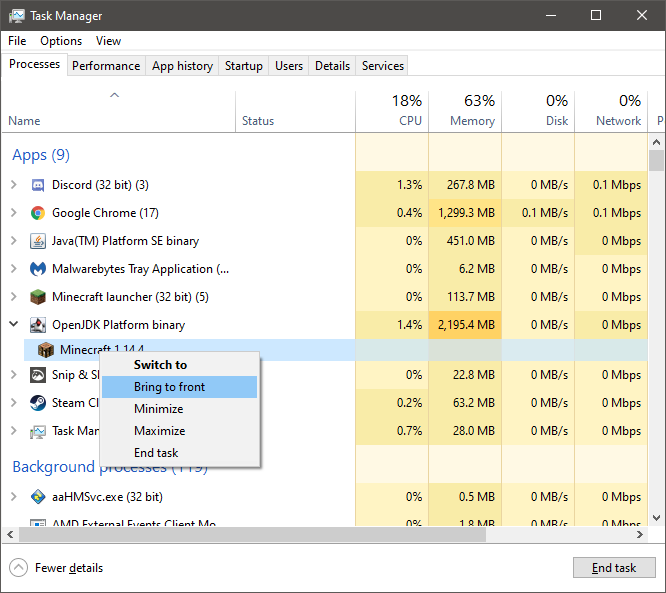
-
Please provide your installer log, it will have the same name as the installer but with .log on the end: Installer: forge-{version}-installer.jar Log: forge-{version}-installer.jar.log Note: If you have Windows Explorer set to hide file extensions(as is the default setting), they will look like this: Installer: forge-{version}-installer Log: forge-{version}-installer.jar
-
Looks like your jar is corrupt or something. I can't be sure you've show all there is.
-
Why do you need to patch Minecraft directly?
-
Your server host is adding -d to their launch arguments thinking it sets the date format or something, however this activates demo mode.
-
Oh god not that thing again. That is not a tool supported by the Forge team. Just use Forge.
-
Your debug.log is nowhere near complete, but it looks like the server slowed down to the point that it killed itself because it decided "I must have frozen or crashed"
-
Forge installs itself as a version of Minecraft. Make a new Profile/Installation and select Forge from the version dropdown. (Note: For some reason Forge 1.12.2 and older gets booted to the bottom of the list.)
-
CurseForge
-
Don't use exclamation points in file names.
-
Please try to run Forge for 1.14.4, then provide the debug.log
-
Open task manager and look for any tasks mentioning Java. If it has an arrow next to it, click the arrow to expand it, there may be one that says "Minecraft" when you expand it. If there is, right click it (Minecraft itself, not the Java heading it's under) and click "Bring to Front".
-
Please provide debug.log files from the client and the server.
-
Where did you get your mods from? Why are you using such an old version of Forge?
-
Are you referring to this mod? https://www.curseforge.com/minecraft/mc-mods/mmd-orespawn
-
1.7.10 is no longer supported on this forum due to its age. Please update to a modern version of Minecraft to receive support.
-
This sounds like you have the mods installed on your client but not your server.
-
First, 9Minecraft is a repost site, it and its ilk should be avoided at all costs. (Pleas esee the mentions of StopModReposts in my signature below). Second, 1.8.9 is no longer supported on this forum due to its age. Please update to a modern version of Minecraft to receive support.
-
OTG does this thing where a component of it is extracted to a 1.12.2 folder in your mods folder. The annoying thing about this is that component depends back on the code of the main part of the mod, so when you remove the main part of the mod that you can see, the extracted part in /mods/1.12.2/ that hasn't done anything to say "I'm in here!" crashes your game.
-
You do realize that multiple versions of Forge are built for each Minecraft version as Forge is developed, updated, and improved.
-
Please provide your installer log, it will have the same name as the installer but with .log on the end: Installer: forge-{version}-installer.jar Log: forge-{version}-installer.jar.log Note: If you have Windows Explorer set to hide file extensions(as is the default setting), they will look like this: Installer: forge-{version}-installer Log: forge-{version}-installer.jar
-
1.7.10 is no longer supported on this forum due to its age. Please update to a modern version of Minecraft to receive support.
-
The only thing that makes (and keeps) it a Forge server is running the Forge jar to launch it, if you launch it with the vanilla jar it will behave as a vanilla server. What hardware are you running that just Forge makes it lag?
-
I was only able to replicate this by pressing "Play" when I already had the game open. Are you sure you don't have the game open in the background or anything?
-
Try deleting fml.toml from the config folder, and don't run Minecraft as admin, there's no need for it.

