lupicus
Members
-
Joined
-
Last visited
Everything posted by lupicus
-
I just inserted your line into example mod doClientStuff: private void doClientStuff(final FMLClientSetupEvent event) { // do something that can only be done on the client LOGGER.info("Got game settings {}", event.getMinecraftSupplier().get().gameSettings); ClientRegistry.bindTileEntityRenderer(ModTileEntities.INFUSER_BLOCK, (trd) -> new InfuserBlockRenderer(trd)); } Here is my dummy block and tile entity (nothing really special going on here): public class InfuserBlock extends Block { public InfuserBlock(Properties properties) { super(properties); } @Override public boolean hasTileEntity(BlockState state) { return true; } @Override public TileEntity createTileEntity(BlockState state, IBlockReader world) { return new InfuserTileEntity(); } } public class InfuserTileEntity extends TileEntity { public InfuserTileEntity() { super(ModTileEntities.INFUSER_BLOCK); } public boolean containsFluid() { return true; } } I played with my version and found that if I remove the notSolid() property when I create the InfuserBlock then it looks black. If you change your properties then you might need to place a new one down.
-
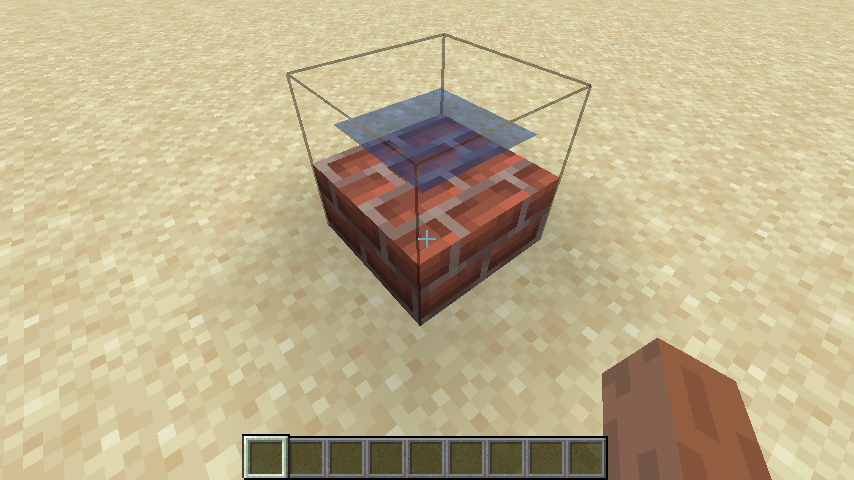
Not sure where your problem is at, but the render code is good. I hacked it in 1.16.4 example mod and didn't change a thing in the render class and used a brick slab model for the infuser block and I got this