DaemonUmbra
Members
-
Joined
-
Last visited
Everything posted by DaemonUmbra
-
You could try manually downloading the 1.12.2 server jar and placing it in the folder just as the error suggests.
-
MCreator is the rickety crutch of people with no knowledge of programming who want to mod minecraft, but do not have the dedication or patience to learn Java, and when that crutch breaks they come here with little to no knowledge of programming to ask for help, where they are inevitably disappointed (or even angered) by the answer of "learn Java and do it properly" as most issues they run into are trivial to fix when using a proper development environment.
-
Try updating your launcher. https://github.com/TheCBProject/CodeChickenLib/issues/166
-
I'm not on this forum 24/7, I had to leave for work shortly after my last reply. Settings can also be found by clicking the triangle next to your name in the top right, it will be in the dropdown. Please list (or provide a screenshot of) the versions of Java that MMC detects on your computer.
-
Your version of Ex Nihilo Adscensio is old and missing a feature that Ex Compressum expects to be there.
-
Can you send me a screenshot of your Twitch launcher? The autodetect for MMC scans for versions, you still have to pick one from the list it gives you (you will need to wait for it to do the scan).
-
For Mojang: It launches but it will not run from what I see in that log, the fix is simply installing the required mod. For MultiMC: Settings Java Auto-Detect and select from the list For Twitch [Jar Launcher]: 3 Lines Top Left File Settings Minecraft Java Version (Rescan button is to the right of the dropdown)
-
Mojang: You are missing a mod that another mod depends on. MultiMC: MultiMC is trying to use a Java 9 or later, which is not supported, Forge requires Java 8 specifically. Twitch: Same deal as MMC
-
Separately, and please pay attention to the preferred method of posting them.
-
The picture doesn't show your taskbar so there are a couple of details missing. When you say you have it in your taskbar and try to open it I assume you mean you see it on your taskbar but the window does not appear, so you click the icon to bring the window up. I think depending on the speed of your computer the command window may appear in the taskbar before it has finished starting, if you click the button to "Open a Command Prompt here" and nothing appears to happen immediately, try leaving it for a second or two before clicking or doing anything else. It should be noted that clicking on the icon of a window/program that is already in focus it actually hides that window, so in your haste you may be telling the window to hide itself while it's technically in focus, but hasn't shown itself yet.
-
You are trying to use 1.10.2 mods with 1.12.2
-
You need to use Java 8, if that doesn’t fix your issue then post logs as described in the EAQ and my signature below.
-
The easiest way is not always the best way, if you want to mod, please learn to do it the right way.
-
Please post logs as described in the EAQ and my signature.
-
Pause needs to be on a new line I think, nogui means that window doesn’t show so you read the command line window.
-
To make a new folder make sure you have nothing selected in the file explorer, then right click anywhere and select New -> Folder, then type the name and hit enter. You'll want to select that folder when setting the Forge installer to extract.
-
Please provide logs as described in my signature.
-
Ok then you'll need to create the folder for it
-
If you've run the installer and there's nothing in there, run the installer again but choose "extract" and set the path to that folder.
-
and what about %AppData%\.minecraft\libraries\net\minecraftforge\forge\1.12.2-14.23.4.2705, same thing?
-
That log looks file, paste this into a file explorer window and tell me if it shows you a file or if it says there's no folder by that name: %AppData%\.minecraft\versions\1.12.2-forge1.12.2-14.23.4.2705
-
That log looks fine, but when another launcher is in play I can't be sure of anything. All I can confirm is that with that log you have run the installer and you should have the files you need. Without seeing your whole setup I can only assume the other launcher has overwritten something.
-
Oh dear... a log is not a file that is needed to run a program unless it is a program specifically designed to read logs (to put them in a more eye-pleasing format, for instance). Logs are created as records of what a program does, including problems it encounters along the way, therefore a program won't "come with it" and if it does then the log included would be a useless one as it was most likely not generated by an identical setup. How did you install Forge and not have an installer log?
-
This is intentional! The files are supposed to already be there if you use the Forge installer, if they are not there and the launcher is trying to download them then either you did not run the installer or something went wrong. This is why I am asking for the installer log, it will have the name [name of installer].log, it is generated when you run the installer and will be in the same folder as the installer unless you deleted it.
-
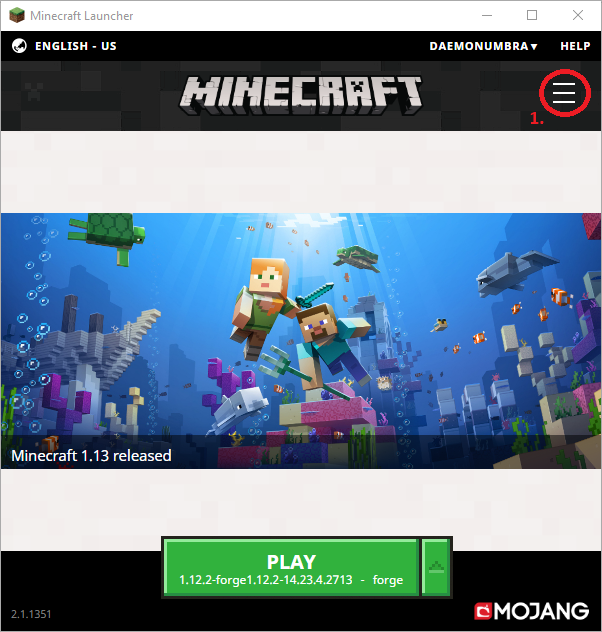
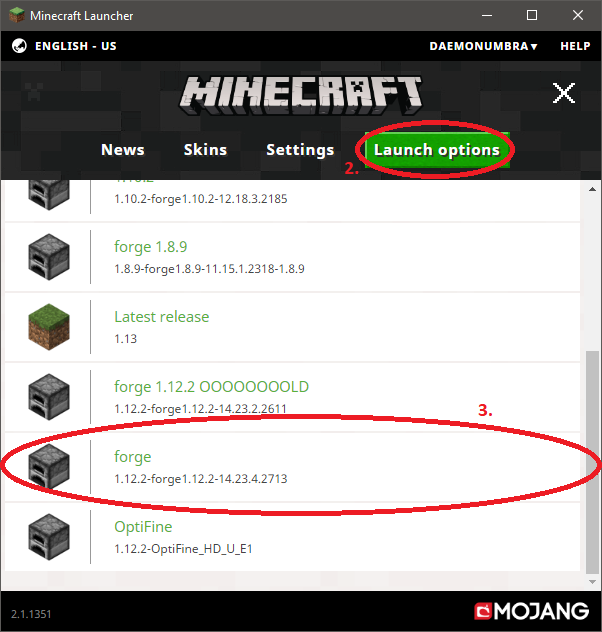
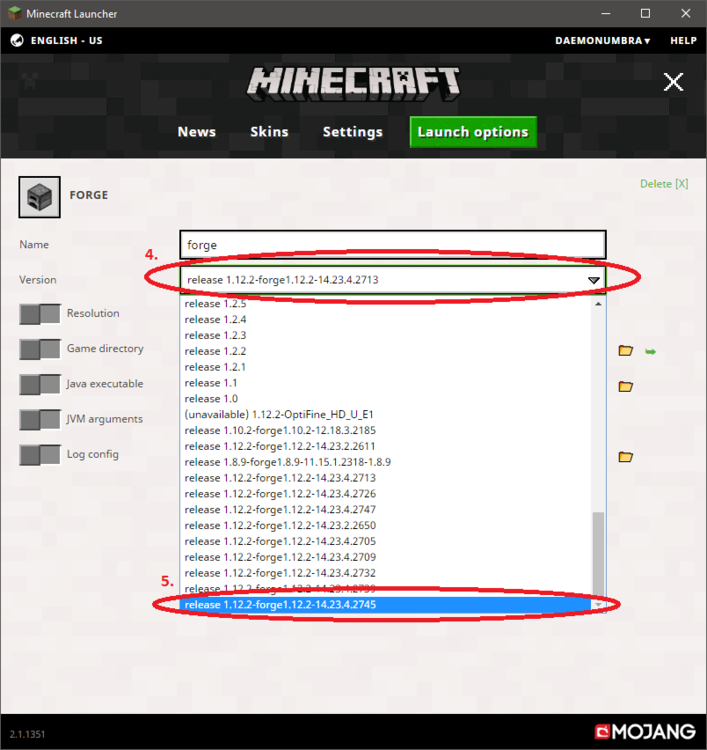
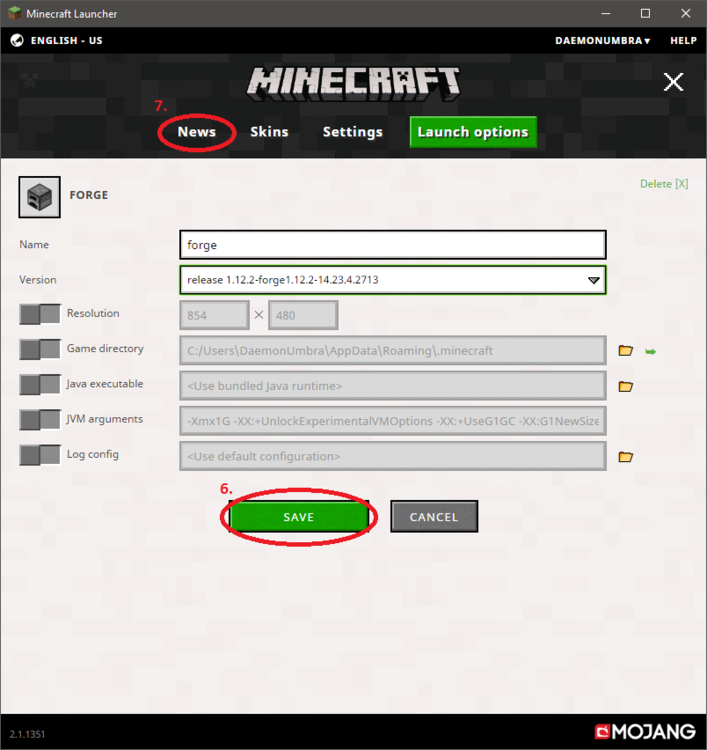
Yes but please don't necro old threads (I split your reply into its own thread). While the new launcher is a little bit less straightforward you can still change the version that a profile uses relatively easily. Step by step images are in the spoiler because they are large.