Draco18s
Members
-
Joined
-
Last visited
Everything posted by Draco18s
-
Remove that AI task and recreate it with a new list.
-
You might have to make an AI task for that. Check how vanilla handles it already.
-
The Item class should already have an OnEntityInteract method (can't remember the exact name, but is used by a few items like shears) that you can use. You'd then want to call entity.setInLove(player). (Maybe it takes the stack? Looking at old code where I was doing it from an AI task, so I was passing null).
-
Try AxeItem and ToolItem. With 1.14 things were moved from prefixes (Item___) to suffixes (___Item).
-
Yeah, his tutorials are garbage. Search these forums for "loremaster" and you'll find dozens of threads of people having the same problems. I've even commented on his videos with things he does wrong.
-
Touche.
-
Yeah, I don't think you can do that with native unicode. I've gone through the list of Unicode Combining Characters pretty thoroughly (combining characters are also used as diacritical marks, but the important thing to know is that they will draw in the same space as the previous character) and there aren't any super/sub script characters that are also combining characters. And oh yeah, writing the renderer for combining characters is a bitch (it gets worse if you want to display it in a selectable text area, too and handle selections and cursor location, etc etc). Minecraft doesn't support it natively at all.
-
You almost certainly don't need this class. There's already a default ItemBlock class, its called ItemBlock.
-
And might want to include more of the log. Missing Variant Exception is often caused by another error listed next.
-
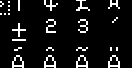
Its less that it's not being displayed correctly as it is that the superscript-2 and the superscript-all-the-other-numbers are handled by different Unicode endpoints which all correspond to different textures. The superscript 2 is probably 0xb2, which is handled by the main minecraft texture pack for ASCII characters (0-255) while the superscript 5 would have to be 0x2075, which is handled down in the extended Unicode support textures, which have a different look and feel to them as they aren't hand-made. Superscript 3 should be 0xb3 and on the same texture sheet as the 2, but its possible that it was never given the Minecraft-look? Went digging into those graphics. The 2 you're getting is....not the 2 from 0xb2 I don't know where its coming from.
-
LootTableLoadEvent would do it. But I think you can also just supply a loot table json file in the appropriate resource folder.
-
The client doesn't know what is in a chest unless that chest is opened.
-
The creative inventory is super magic special (the client gets to dictate inventory changes, overriding the server), so that doesn't really surprise me.
-
See this? This is your constructor. See this? It does not call super. This means it calls public ItemBase() implicitly. Which is a function that does not exist. There's your problem. But as Cadiboo already stated, you don't need ItemBase, that class already exists, its called Item.
-
Are you doing this client side or server side?
-
1) You have fields that you can't have (what happens when there's more than 1 player?) You shouldn't need either of these variables anyway. If the sword exists, it must be in the active hand to be removed (if the sword exists at all, and can be removed, then its been spawend). If the player moves the sword to a different slot then itemArea will be wrong. 2) RightClickEmpty already runs when the active hand slot is empty, so why are you checking to see if the active hand slot is empty? 3) And of course, if there's a sword in that slot, the event won't fire because you right clicked while not empty 4) Your code style is awful, please put the two if statements on line 38 on different lines and correctly indent things. 5) Don't check chest.getItem().equals(ModItems.HANZOS_CHESTPLATE) && playerIn.isSneaking() twice. Put those in the outer if statement.
-
You're almost certainly locking up the main thread while you do....that
-
This is old, old code (circa 1.7.10 originally, updated to work with 1.10), but this will handle the light source, as a block, utilizing as few updates as possible. Any data stored in the ItemStack NBT should be changed to use a capability, but that's all the necessary information. https://github.com/Draco18s/Artifacts/blob/master/main/java/com/draco18s/artifacts/components/ComponentLight.java#L63-L126 "That's not an Item!" you say. "Doesn't fucking matter, its the same function signature that does exist in Item" You'll just have to figure out what that function looks like now.
-
You shouldn't be doing this in 1.13, you should be using two separate item instances.
-
Also, as you are a user-of-mods not a maker-of-mods you're kind of in the wrong place on that front too.
-
Well, there's still the problem that a banned mod need not report itself to the "Forge" server. Remember: The client is a lying, cheating bastard. Never, ever trust the client.
-
I'm mostly just getting the feel for things at the moment. Working on my ancillary helper classes. Most of it should port forward to 1.14 anyway.
-
Cool. I also addressed that. I can dig into the source all day long but it won't ever actually solve my problem because if it works for someone else and not for me, then that code isn't actually the problem is it? Mind making a PR to fix the readme and readthedocs pages? It'd be nice if those were accurate for once. I've attempted to in the past, but nothing ever gets done about it because it's apparently so horrifyingly low priority and that "it doesn't matter because people figure it out anyway" that I get ignored. But yeah, sure, I'll nuke everything and start over. I don't mind one bit. I want to know where I went wrong, and if it was getting the dev environment set up correctly, then I would not be surprised: the instructions are wrong. I'd go somewhere else for a tutorial, but we all know how awful those tutorials are, silly me for thinking that the official instructions would actually be correct. Haha! Anyway, that seems to have worked.
-
Cool. That also doesn't really help me narrow down the problem any. I'm sure I could dig into that code for quite a while, but it does me no good if @Mod is not going to do what @Mod is supposed to do. What would you like me to do at this point? I have supplied all of the necessary information usually required to figure out what I did wrong, and then some. Yet no one has said what I've done wrong. If I haven't done anything wrong and it's a bug in Forge, then tell me to file an issue with Forge and I can do that.
-
Ok wow. I didn't expect that. I just dug into things myself and I can't find how vanilla draws durability bars. Those functions were completely removed. AH HA, they were moved into an interface called IForgeItem. getDurabilityForDisplay, showDurabilityBar, getRGBDurabilityForDisplay I realize that its cleaner to perform as few edits to the vanilla classes as possible, but jeeze, even knowing this functions had to exist somewhere did not make them easy to find. I literally had to go find the item renderer class and start from there. We can no longer tell people "just go look at vanilla" we also have to say "...and Forge's extension interface" and then people will have to ask "wtf is that? where is it?"