




Ugdhar
Moderators
-
Joined
-
Last visited
Everything posted by Ugdhar
-
 Report the issue to the ExtraUtils2 author.
 -
You should probably mention this to the mod authors
-
http://mcforge.readthedocs.io/en/latest/gettingstarted/#from-zero-to-modding That should get your workspace setup, if it's still bugging out show the updated screenshot
-
You should update, 1.7.10 is no longer supported here.
-
This post is nearing 3 years old, if you are having an issue, you should open a new thread. 1.7.10 is no longer supported here, you should be developing for 1.11.2
Also note that 1.7.10 is no longer supported, you should update.
This thread is over 3 years old, and you're trying to do something in a completely different version. Start a new thread, explain the problem, show your code, and post fml-client-latest log you'll get more help that way
rename the lang file to be all lowercase
You should post the log from your run without the texture pack *just so that there aren't any items at play besides forge and MC
Did you try removing the resource pack you're using? Also, 1.12 is still in really early development, so until a stable/recommended build is released, it will probably be a bit glitchy.
Did you try searching ItemBow for the word "event"?
You should upload your code to a github repository, it makes it easier to share when you need help, and will show all of your code (sometimes the part that needs fixing isn't the part that gets pasted into a forum post). Also post the fml-client-latest log A screenshot doesn't really give us anything to go by
If you remove the shader mod, does it still crash? If not, you should probably contact the author of that mod, I would guess something in it is broken, or maybe a version mismatch or something. Can you post the fml-client-latest log?
You must be following old outdated tutorials, you do not want to be using getItemModelMesher. That may not be specifically the issue, but it won't help. You should probably find a tutorial/examples that are more for 1.11.2 instead of the old ones you're using (you should be creating/registering an ItemBlock for your Block rather than an Item, I'm guessing the old outdated tutorial you're following was having you do that. Check out this thread: http://www.minecraftforge.net/forum/topic/49497-1112-is-using-registryevent-this-way-ok/#comment-249433
Which line is line 43? (I'm assuming what you pasted doesn't start at the beginning of the file, since I don't see any imports) edit:Also, this isn't a ForgeGradle issue, in the future you should post things like this right in Modder Support
Where did you buy it from, and what specifically is it called? If it is the "Windows 10 Edition" it cannot run forge, you need the Java edition. Unfortunately I can't get a direct link to the one you'd want on minecraft.net, but on the list of editions it's just "Windows".
%USERPROFILE%\AppData\Roaming\.minecraft\logs\fml-client-latest.log
You need to update, 1.7.10 is no longer supported on these forums. It is stated in the EAQ that old versions are not supported here: http://www.minecraftforge.net/forum/topic/20-rules-and-eaq-read-first-or-you-will-get-banned/
Are all your resource names lowercase? I believe that became a requirement in 1.11, that's my best guess without seeing logs and whatnot.
Post the full fml-client-latest log please
You might be able to find the version you want from the Files link at the top of the page, however, if you run into issues a Minecraft version that old will not be supported here, so you would have to seek help elsewhere.
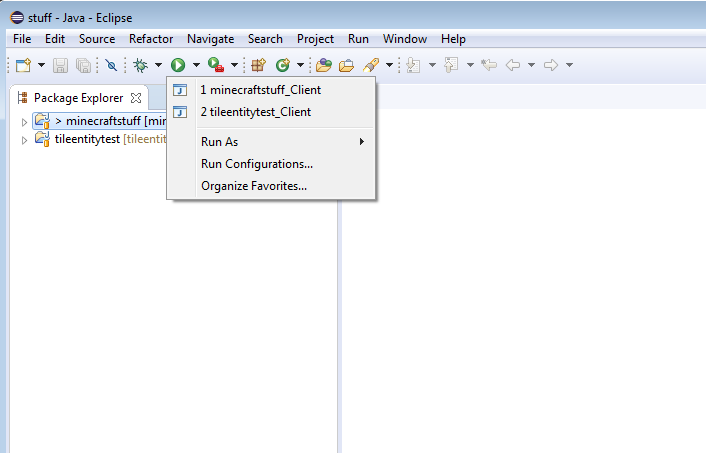
If you're using eclipse, just import each project into the same workspace, and each project will have it's own run configurations.
 Doesn't matter where it came from or who uses it, 1.7.10 is so out of date it is no longer supported here. You should take the issue right to the modpack creators.

Important Information
By using this site, you agree to our Terms of Use.