



Leaderboard
-

TileEntity
Superhelper66Points4545Posts -
Paint_Ninja
Community Manager15Points804Posts -
Ugdhar
Moderators8Points2817Posts -
LexManos
Forge Code God6Points9289Posts




Popular Content
Showing content with the highest reputation since 12/30/24 in all areas
-
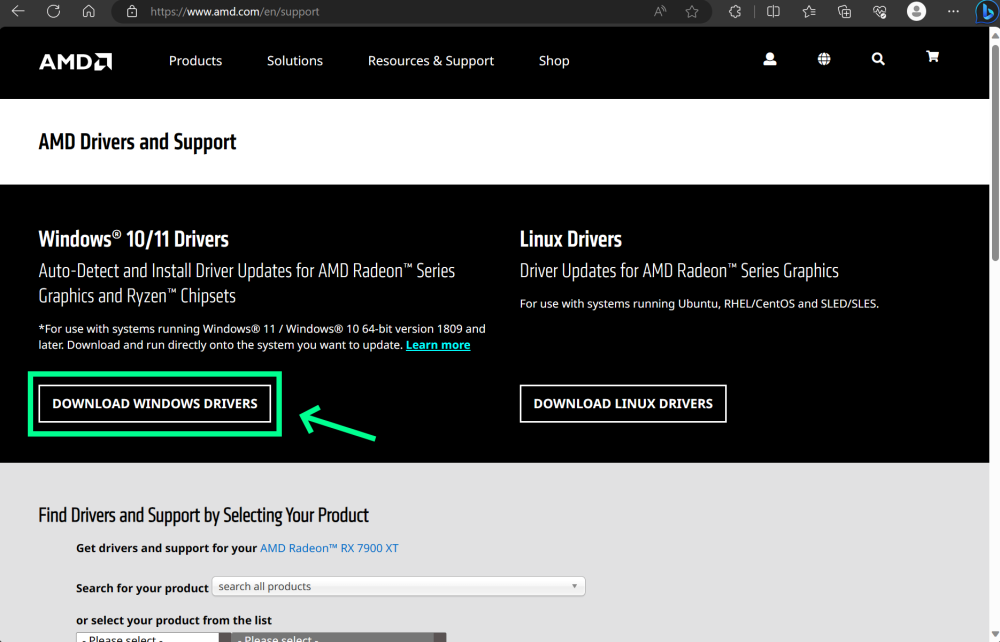
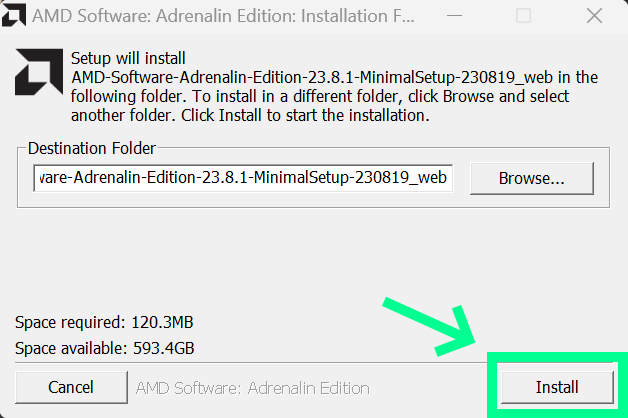
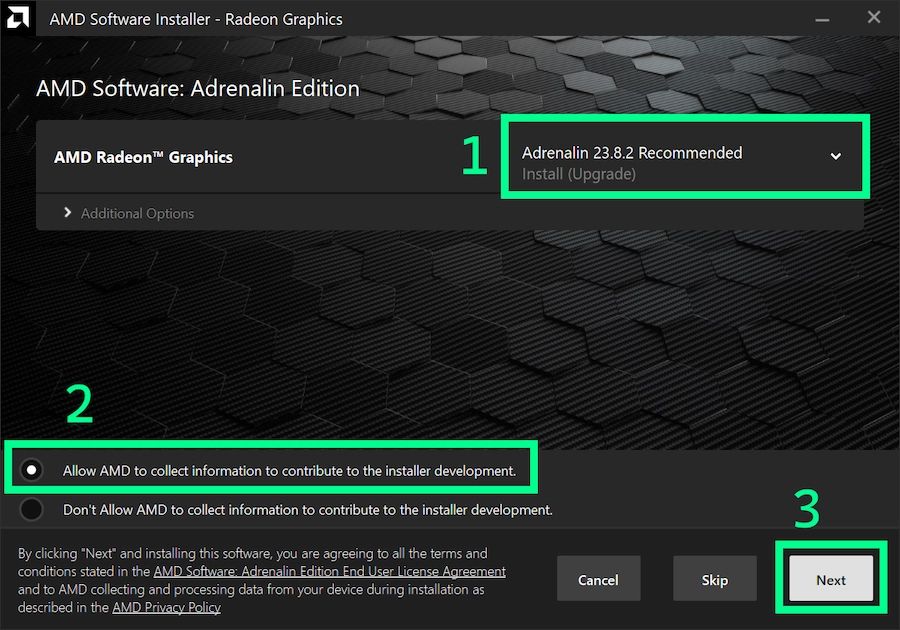
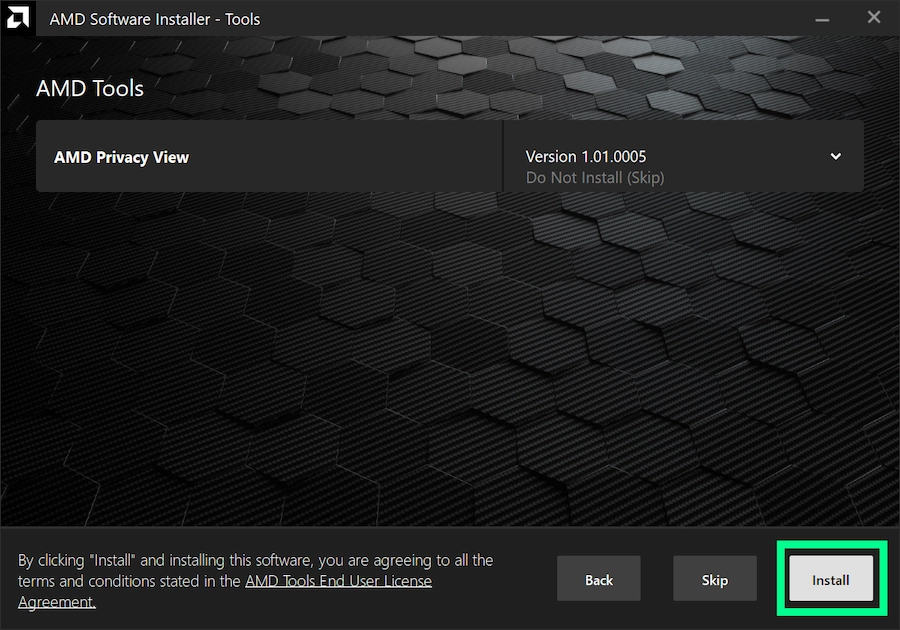
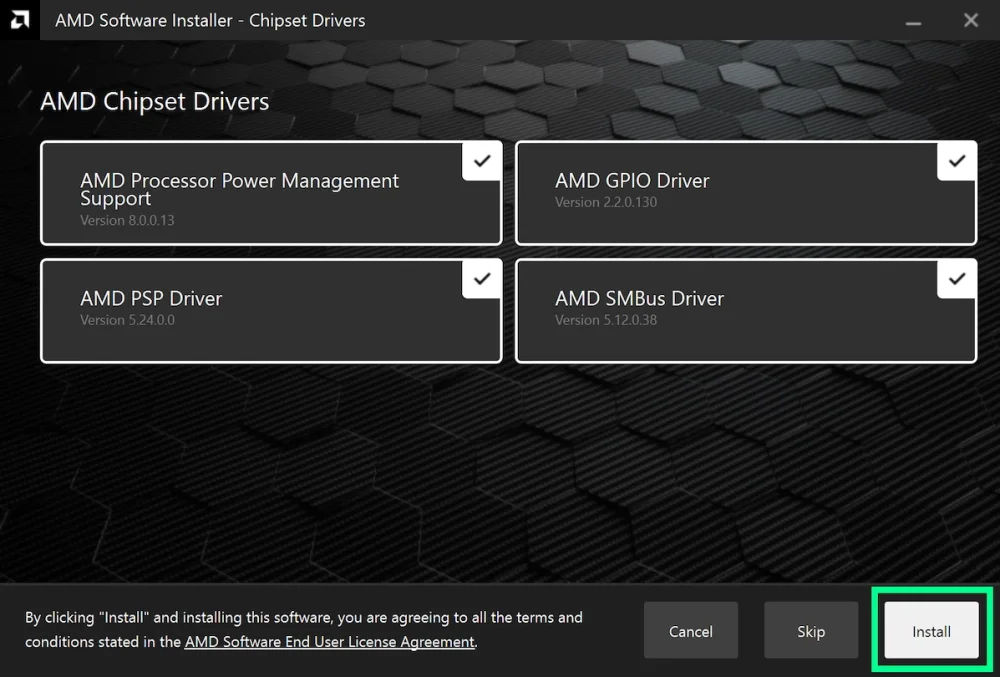
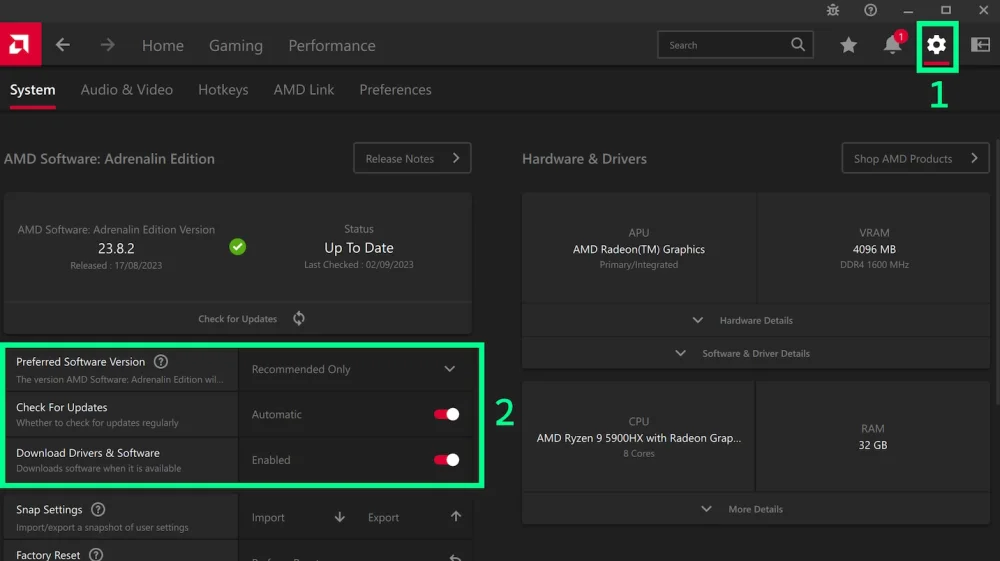
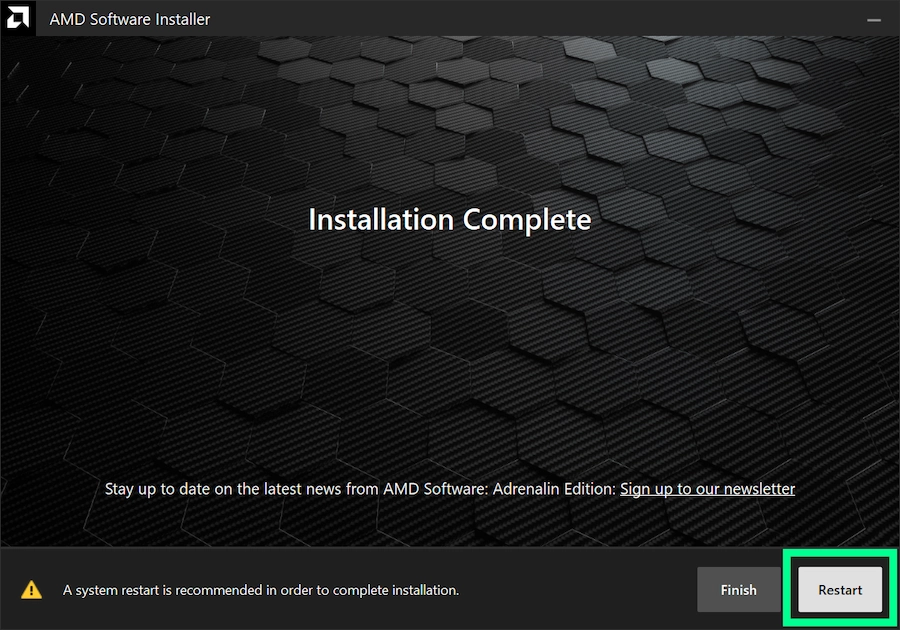
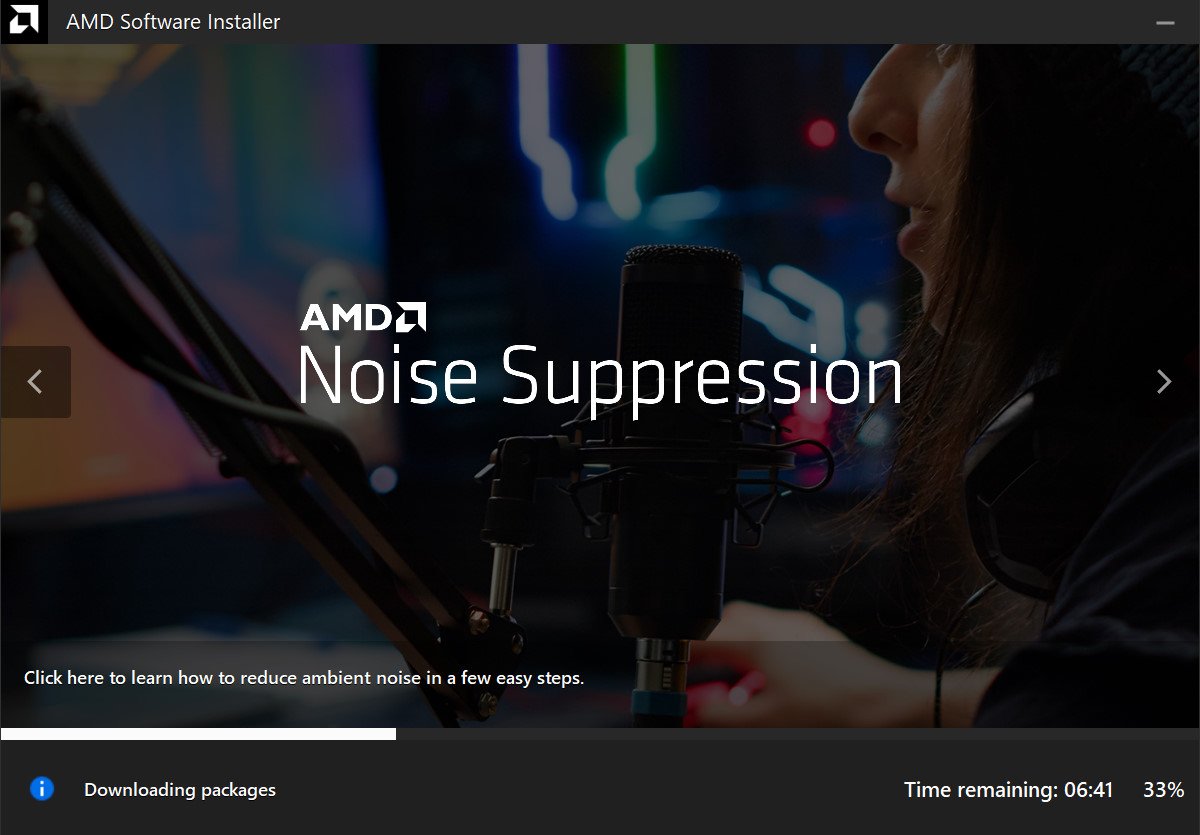
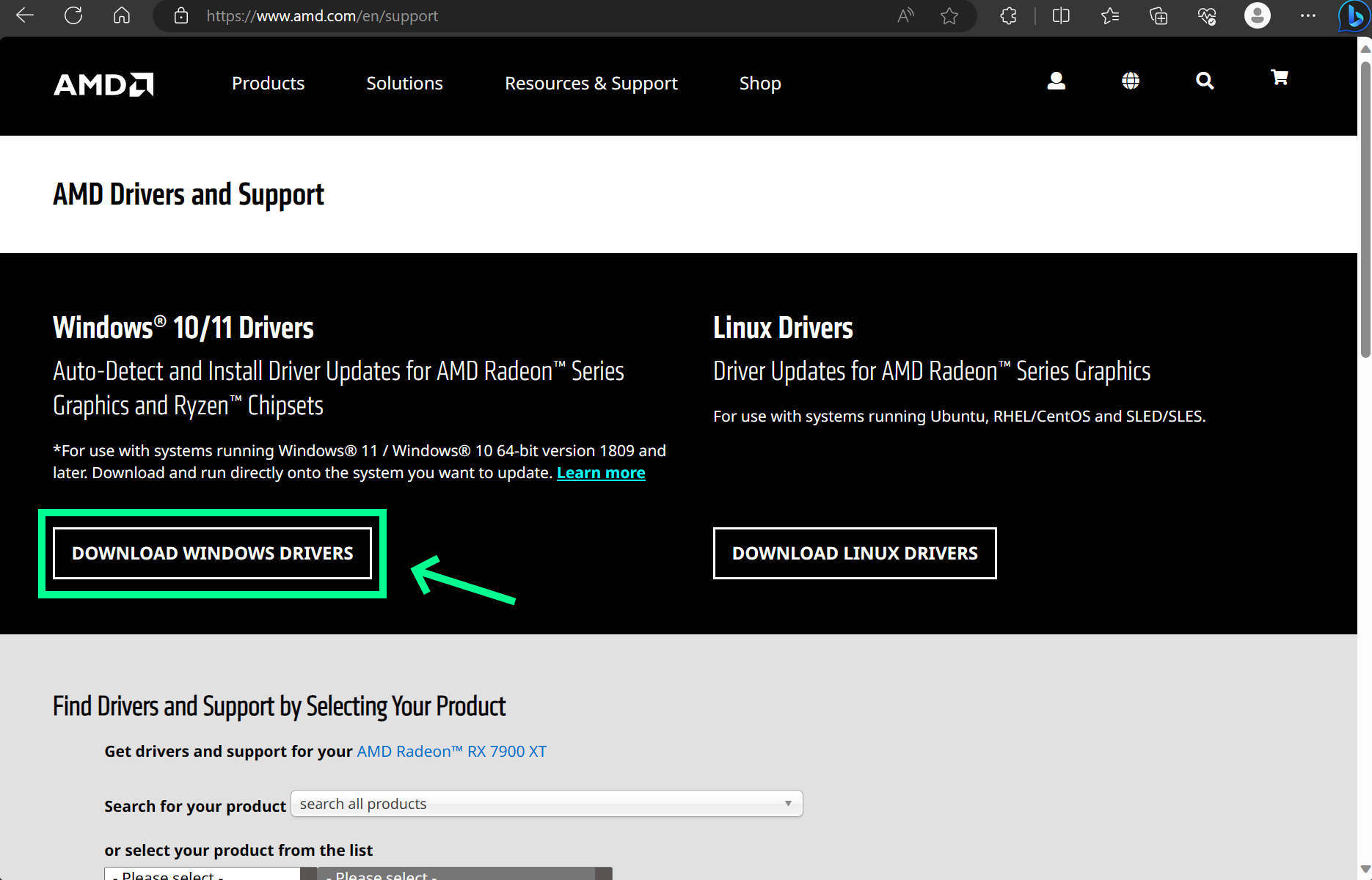
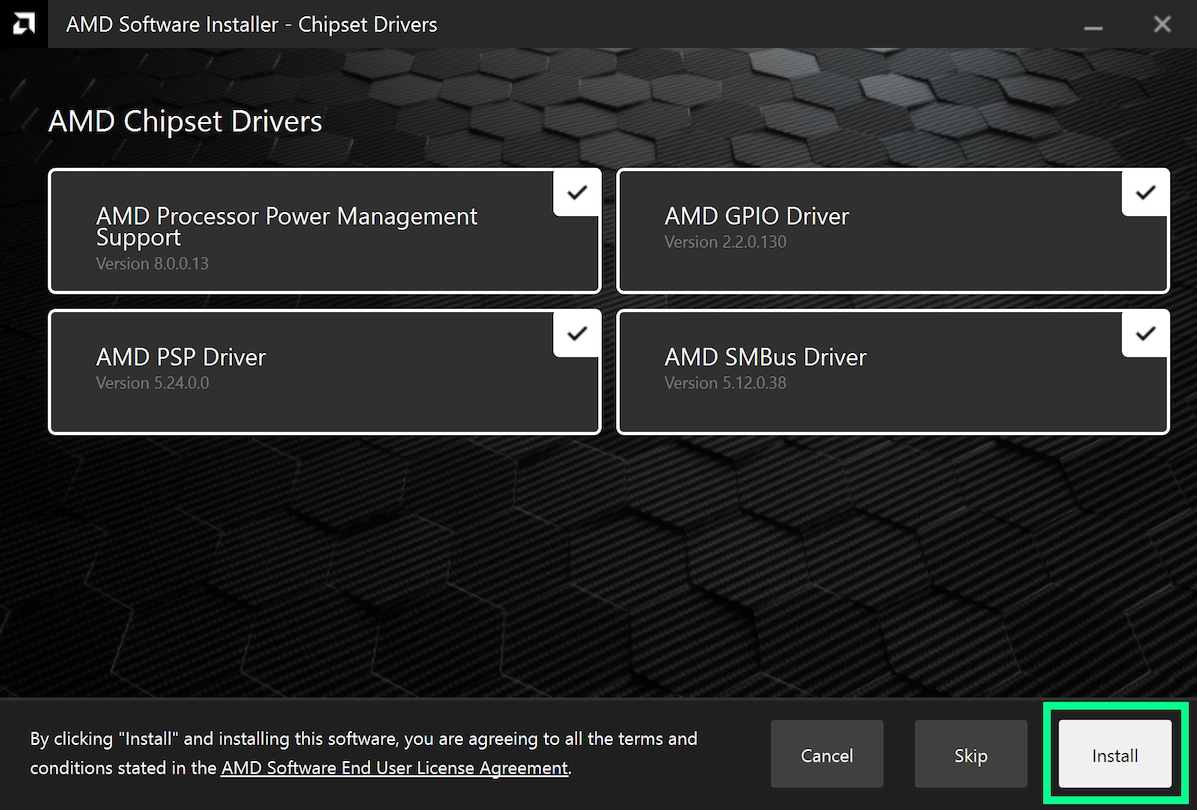
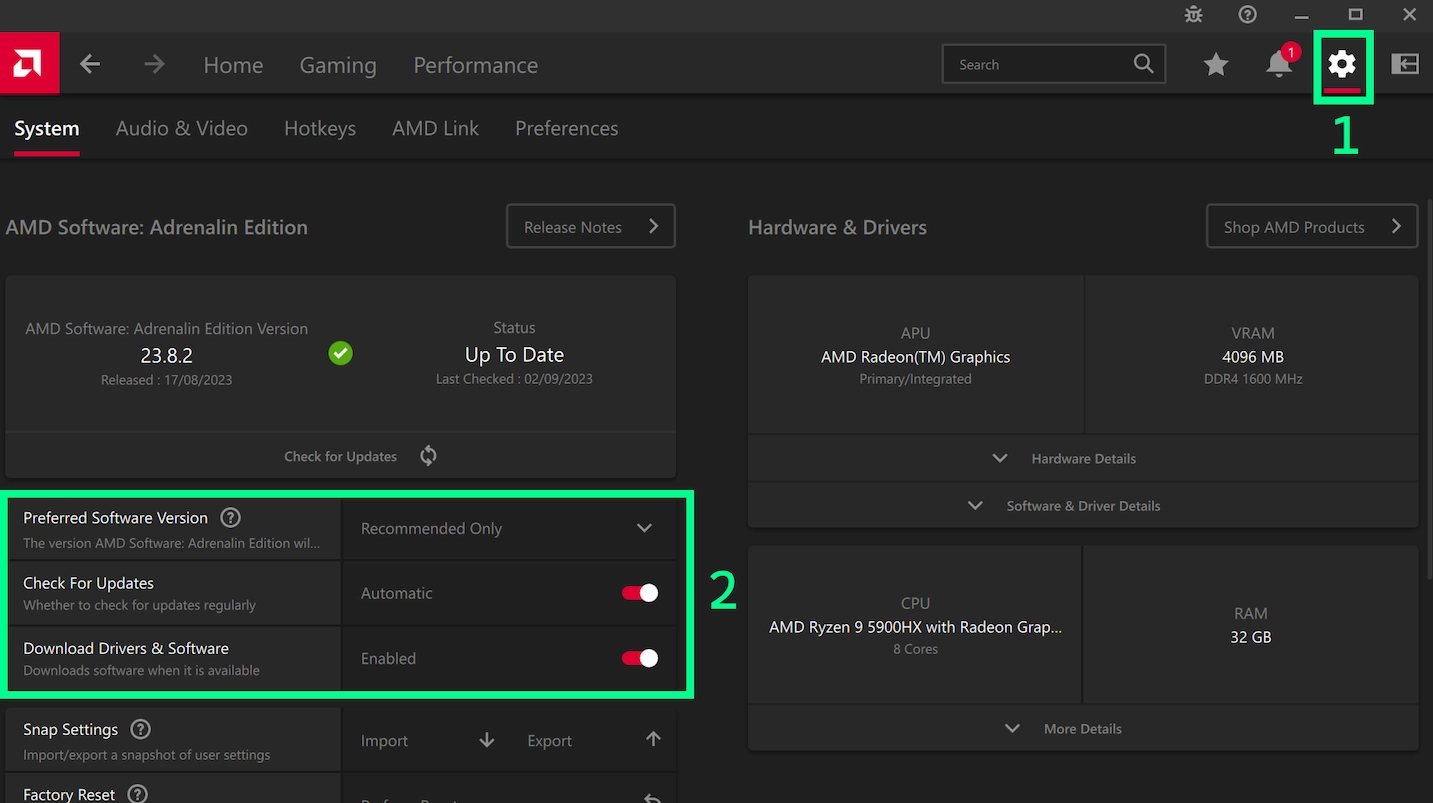
This FAQ has many guides and solutions - reading this before asking for help could save you a lot of time, as it accounts for the vast majority of issues people run into that we're aware of but can't fix on our end. Supported versions and platforms We only support Forge here. We cannot help you with Fabric, Spigot, etc... We support all versions under the tiered support policy. Full support for 1.21.10, 1.21.8, 1.21.5, 1.21.4, 1.21.3, 1.21.1, 1.20.6, 1.20.4 and 1.20.1 Legacy support for all other versions Minimal support for select versions (e.g. 1.20.3 - use 1.20.4 instead) More details here. Rules Piracy (aka "cracked launchers") and cheats (aka "PvP clients", "x-ray mods", etc...) are strictly forbidden here. When you need help, please always make a new thread. Do not post in old support threads. When making a new thread, you must include a link to your log on https://pastebin.com or https://paste.ee. Instructions on where to find this and how to upload it are in this forum post. Exit/error codes Here's a list of exit codes and what they mean: Error code 0: Someone clicked "Quit game" and the game closed successfully Error code 1 and -1: The game crashed, refer to the log and/or crash report for details Error code -1073741819: A game library crashed. Update your drivers and make sure you're using the right Java version Where can I find the debug.log and crash report? Official Minecraft launcher Spoiler Open the launcher and click the "Installations" tab at the top Hover over the Forge profile and click the folder icon The debug.log is in the logs folder Crash reports are in the crash-reports folder - the latest one will do If there's no crash reports in that folder, don't worry about it. We can still help as long as we have the debug.log. Go to https://pastebin.com or https://paste.ee and paste the debug.log there. Share the link to it when making a new support thread. Do the same for the latest crash report if available. Note that Windows by default hides file extensions for known file types, so the file might look like "debug" instead. Do not post the files called "debug-<number>.log.gz" as they are old logs. To show file extensions, follow this guide: https://www.howtogeek.com/205086/beginner-how-to-make-windows-show-file-extensions/ CurseForge app Spoiler The CurseForge app disables the debug.log by default, so we need to turn it back on in the settings: Open the CurseForge app and click the cog on the bottom left Click the Minecraft tab on the right, scroll down and turn on the "Enable Forge debug.log", then click the X near the top to save You'll need to start the game again to make the log Now how to get the debug.log and latest crash report: Right click the modpack you're having trouble with Click "Open Folder" The debug.log is in the logs folder Crash reports are in the crash-reports folder - the latest one will do If there's no crash reports in that folder, don't worry about it. We can still help as long as we have the debug.log. Go to https://pastebin.com or https://paste.ee and paste the debug.log there. Share the link to it when making a new support thread. Do the same for the latest crash report if available. Note that Windows by default hides file extensions for known file types, so the file might look like "debug" instead. Do not post the files called "debug-<number>.log.gz" as they are old logs. To show file extensions, follow this guide: https://www.howtogeek.com/205086/beginner-how-to-make-windows-show-file-extensions/ MultiMC/PolyMC/Prism launcher Spoiler Open the launcher and right click the instance you're having trouble with Click "Edit" in the context menu and go to the "Other logs" tab Change the dropdown at the top to "logs/debug.log" Click the "Upload" button and click yes. Click the blue "link to the uploaded log" to get the link. It's also copied to your clipboard. Repeat steps 3-5 for the latest crash report, if there's an option for it in the dropdown Share the links when making a new support thread. Where can I find the installer log? Spoiler The installer log will be created in the same place as the installer and be have the same name as the installer, but ".log" on the end. For example, if the installer is called forge-1.20.1-47.1.0-installer.jar and is in the Downloads folder, the log will be called forge-1.20.1-47.1.0-installer.jar.log and located in the Downloads folder. Go to https://pastebin.com or https://paste.ee and paste the debug.log there. Share the link to it when making a new support thread. Note that Windows by default hides file extensions for known file types, so the actual jar may not say ".jar" at the end with the log saying ".jar" at the end instead of ".jar.log". To avoid confusion, you can turn this off by following this guide: https://www.howtogeek.com/205086/beginner-how-to-make-windows-show-file-extensions/ Where can I find the launcher log? Most of the time you don't need to share this, so only share it when asked by a support volunteer or when you're unable to find any debug.log or crash report. Official Minecraft launcher Spoiler Open the launcher and click the "Installations" tab at the top Hover over the Forge profile and click the folder icon There should be a file called launcher_log.txt . If you can't find it, try opening the %AppData%\.minecraft folder and looking there Go to https://pastebin.com or https://paste.ee and paste the contents of the launcher log there. Share the link to it in your support thread. CurseForge app Spoiler Open the CurseForge app and right click the modpack you're having trouble with Click "Open Folder" Go up two directories, then go to the "Install" folder There should be a file called launcher_log.txt . If you can't find it, try opening the %UserProfile%\curseforge\minecraft\Install folder and looking there Go to https://pastebin.com or https://paste.ee and paste the contents of the launcher log there. Share the link to it in your support thread. What version of Java do I need? | Minecraft version | Forge version | Java version ||-------------------|---------------|--------------|| 1.20.6 or newer | 50.x or newer | 21 || 1.18 - 1.20.4 | 38.x or newer | 17 || 1.17.1 | 37.x | 16 || 1.16.5 or older | 36.x or older | 8 | How do I install Java? Windows Spoiler Windows 11 - WinGet method (recommended) Spoiler Open the Windows Terminal Run one of these commands, depending on the version of Java you need: Minecraft 1.18+ needs Java 17: WinGet install Microsoft.OpenJDK.17 Minecraft 1.17.1 needs Java 16: WinGet install Microsoft.OpenJDK.16 Minecraft 1.16.5 and older need Java 8: WinGet install Azul.Zulu.8.JDK Restart your PC once the install is complete If WinGet is not found, open the Microsoft Store and check for updates by clicking the "Library" button on the bottom left, then "Get updates" on the top right. Windows - Installer method Spoiler Go to https://adoptium.net/en-GB/temurin/releases/ Change the drop-down boxes to: Operating system: Windows Architecture: x64 Package type: JDK Version: (see the "What version of Java do I need?" section above in this forum post) Download the .msi installer and run it On the custom setup section of the installer, install the "Set JAVA_HOME variable" by clicking the red X icon next to it and changing it to a drive Install and restart your PC once complete macOS Spoiler Go to https://adoptium.net/en-GB/temurin/releases/ Change the drop-down boxes to: Operating system: macOS Architecture: x64 for Intel, aarch64 for Apple Silicon Package type: JDK Version: (see the "What version of Java do I need?" section above in this forum post) Download and install the .pkg file Include the "Set JAVA_HOME variable" feature Install and restart your Mac once complete Linux Spoiler Unfortunately due to the lack of consistency between Linux distros, it is not possible to give exact instructions on how to install Java. In most cases you need to use a package manager and search for a "JDK" package to install, then manually set your JAVA_HOME. If running a Linux server, ask your server host for help. How do I install the Forge client to the official Minecraft Launcher? Spoiler Make sure you have Java installed first and that the Minecraft Launcher is closed Download the Forge installer from the official files page Double-click the installer to run it If this doesn't work even with Java installed, use Jarfix (Windows only) or run the file from the command line instead. Choose the "Install client" option and click "Ok" Open the Minecraft Launcher and you should see the Forge installation selected It is highly recommended you run any modded versions in separate folders using the "Game Directory" setting in the launcher. This will store all your save files, configs, mods, etc. in whatever folder you specify (instead of just .minecraft) so they do not interfere with your vanilla installation (or other modded versions you may have installed) and vice-versa. To set the game directory: Click the "Installations" tab at the top of the launcher Hover over the Forge install in the list Click the "..." then click "Edit" Change the game directory to a different folder, for example making one called "Forge-1.20.1" and putting it there. How do I install the Forge server? Spoiler Make sure you have Java installed first Download the Forge installer from the official files page Double-click the installer to run it If this doesn't work even with Java installed, use Jarfix (Windows only) or run the file from the command line instead. Choose the "Install server" option, choose the folder you want the server installed to and click "Ok". For example, you could put it in a new folder on the desktop called "ForgeServer-1.20.1" Open the folder you installed Forge to and double click the "run.bat" file on Windows, "run.sh" on macOS or Linux. To change the amount of RAM allocated to the game server, edit the user_jvm_args.txt file. Note that allocating excessive amounts of RAM can cause performance issues, as can too little - so don't rush out to change it to 20GB or something silly and expect the game to run well. Where can I find the forge.jar to start my server? Spoiler With the move to modern Java starting from Minecraft 1.17, Forge decided to take advantage of modern Java features. Unfortunately, this meant that you can't run a jar directly anymore because modern Java requires special command-line arguments to be specified which can change per Forge release. Instead, you need to use the provided run.bat/run.sh files to start the server and change your JVM args (like memory allocation) in the user_jvm_args.txt file. Forge immediately crashes on launch without any mods installed, how do I fix it? Spoiler First, make sure you're using the correct Java version (see the "What version of Java do I need?" section above in this forum post) for the version of Minecraft you're running Next, make sure your drivers are up-to-date Important! If your drivers are in a broken state, they will erroneously claim they're up-to-date when they're really not and sometimes even undo a manual update after a couple of reboots. To properly fix this, follow the driver update guide in this FAQ, as it walks you through making sure it worked and how to prevent it from being undone. If you are still having trouble after updating drivers and using the right Java version, make a new support thread for further help, including a link to your debug.log and crash report on https://pastebin.com if possible (instructions on how to do this are near the top of this forum post). Where can I find Forge mods? https://www.curseforge.com/minecraft/search?page=1&gameFlavorsIds=1 Make sure you download the right version of a mod for your Minecraft version. My game is lagging, how can I find the culprit? Spoiler There's a few things you can try... Make sure your drivers are up-to-date Important! If your drivers are in a broken state, they will erroneously claim they're up-to-date when they're really not and sometimes even undo a manual update after a couple of reboots. To properly fix this, follow the driver update guide in this FAQ, as it walks you through making sure it worked and how to prevent it from being undone. If you have a laptop with dedicated graphics, make sure the game is using your dedicated graphics rather than integrated graphics Don't allocate too much RAM to the game. Allocating excessive amounts of memory can hurt performance. Lower your video settings in Options -> Video Settings Render distance makes the biggest impact Set your Simulation distance to be the same as or slightly lower than your render distance The same applies to dedicated servers in the server.properties file Look for laggy mods using Spark https://spark.lucko.me/download While in-game, run /sparkc profiler On dedicated servers, run "/spark profiler" instead (no 'c') Wait a couple of minutes Run /sparkc profiler --stop On dedicated servers, run "/spark profiler --stop" instead (no 'c') Open the link and click the "mods" button The list should show you some mods and the % of time they're taking up. Consider removing mods that take an abnormally long time compared to everything else Update to a newer version of Forge and Minecraft if available. Vanilla MC 1.20 in particular had a major performance uplift from the new lighting engine Likewise check for updates for your mods in case they've made any performance improvements or fixes Close background apps while playing the game, or at least reduce the amount of open web browser tabs If you are still having performance issues, make a new support thread with a link to your debug.log and Spark results page and we'll look into it. How do I update my drivers? Spoiler AMD Spoiler 1. Go to https://www.amd.com/en/support and click the "Download Windows drivers" on the top left 2. Run the installer downloaded in step 1 and click the install button on the bottom right 3. First, make sure you have selected the "Recommended" (aka stable) version. Avoid "Optional" as those are experimental beta drivers that are unfinished and may be buggy. Second, click "Allow AMD to collect information to contribute to the installer development" so that AMD can automatically send anonymous error reports on your behalf if you have problems, to help fix things for everyone. Finally, click "Next"/"Install" on the bottom right. 4. You may be asked if you want any optional extra features/tools that AMD provides. This can be stuff such as Privacy View which uses eye tracking to prevent people from looking over your shoulder. By default this is all skipped (it says "Do Not Install (Skip)" next to each entry), up to you if you want it or not. Click "Install" on the bottom right to install the graphics drivers. 5. If you have an AMD CPU/APU/processor such as Ryzen, you'll be asked to install drivers for that as well. Minecraft is a CPU-heavy game so installing/updating these is a good idea for best performance. Click "Install" on the bottom right to install the CPU and chipset drivers. 6. Wait for everything to download and install. Your screen may go black for a bit or flash while installing - this is normal. Avoid gaming or watching videos while it installs. 7. If everything worked, you should see this screen. Click "Restart" on the bottom right. If it failed, go to step 9. 8. Open AMD Software: Adrenalin Edition, click the cog on the top right, change the "Preferred Software Version" to "Recommended Only" to avoid getting beta drivers and turn on the two options below that to get automatic updates. This page also tell you what version you're using. In this example, 23.8.2 means the second driver release in August (8th month) 2023. If it says you have a version from July 2022 to October 2022 inclusive (22.7.1 - 22.10.1), the driver update failed and you are still using old beta drivers, so you'll need to follow step 9 then repeat steps 1 to 8 afterwards. If all's good, then congratulations, you've successfully updated your drivers! 9. If the driver update fails, carefully follow all the steps for the AMD Cleanup Utility found here: https://www.amd.com/en/support/kb/faq/gpu-601 . Once you've done all the steps in that guide to fully remove the old broken drivers, restart your computer one more time then repeat steps 1-8 here to install the new drivers again. Nvidia Spoiler No detailed instructions yet as I need someone with Nvidia graphics to send me screenshots of the whole process. https://www.nvidia.com/Download/index.aspx?lang=en-gb Intel Spoiler No detailed instructions yet as I need someone with Intel graphics to send me screenshots of the whole process. https://www.intel.com/content/www/us/en/download-center/home.html
 9 points
 -
4 pointsThis has already been the de-facto standard for quite a while now, but figured it would be a good idea to properly formalise it and make it clear for everyone. TL;DR: You can ask and offer support for Forge on any MC version, as long as you're not demanding it from staff and can accept that older versions may receive less attention due to people moving on to newer, shinier things. Tiered support policy There are now essentially three tiers of support: full, legacy and minimal. Full support This tier has dedicated channels for help on the Discord, gets priority for documentation, new features and bugfixes, and is generally considered the main focus for Forge development and support. Triage actively ports and backports things as needed for versions within this tier where time allows. The MC versions covered by this follows the existing "LTS" system. In other words, the latest MC version and select versions before it are covered by this tier. We recommend people consider using the newest version possible, as it's likely to be fully supported for longer. Exact versions covered under the full support tier can be found near the top of the FAQ. Legacy support This tier is for older versions of MC that are no longer covered by the full support tier. This tier gets less attention, but is still supported to some extent. To be clear, this is not a "no support" tier, but it is not the main focus. You're welcome to ask for help, submit PRs and help out, but please be aware that you may not get a response as quickly as these versions are generally not as popular anymore and may not have as many people around to help. Staff may still choose to work on these legacy versions and help people, but please don't demand it from them. Please note that due to the nature of the old toolchains used for building legacy versions, developing mods using the default MDK may not work. We also cannot easily publish updates to some of these old versions without your help - if you're interested in fixing this, please reach out to us. Minimal support This is rare and usually only applies to versions of MC where there's no legitimate reason to be using them. A real-world example of this is 1.20.3, which had a data loss bug that was fixed in 1.20.4 shortly after. All mods made for 1.20.3 work on 1.20.4, so there's no reason to use 1.20.3. We will help you update to the fixed version instead, but that's about it.4 points
-
3 pointsHello! I think what you made is awesome! Sadly, I do not have discord. But I hope we can become great friends later on! Have a blessed weekend!3 points
-
Unfortunately, it seems that Invision has decided that everything is locked down and no longer customizable. Their attitude to anyone who wants to edit anything is 'Just accept it we know best and screw you for even insinuating that you want to customize your own site' So there isn't much we can do about the layout of actual features. Best bet for the editor is that psudo markdown works, so typing ` around words make code blocks. Only options is to start writing bespoke modifications to the forum's php code itself, which I really don't want to do. I would of stayed on v4 but the version of PHP that it supports is going EOL and Invision has stated they have no intentions of upgrading it. They also removed the central community for finding plugins/community addons. Overall it is my feeling that they are intentionally trying to kill off self-hosting communities by removing features and locking things down, in an effort to force everyone into using their paid hosting services. My HOPE is that someone in the overall forum community will write an exporter for Invision to something like SMF. Which is what we were originally on before old team members decided enterprise software is better.2 points
-
2 pointsFor some reason I can't place anything inside smithing table on forge 1.20.1, it doesn't show up as a recipe for netherite either in the JEI menu.2 points
-
Forge for 1.21.6 and newer uses EventBus 7, which is a major rewrite. You can read the migration guide here, this explains how to cancel events.2 points
-
2 pointsHonestly, the forums are a back burner thing. Not many people use it. Best option is discord. I know that I haven't looked at the forums for more then admin tasks in quite a while. You're also best off not following tutorials which give you code. Knowing programming and reading the MC/Forge code yourself would be the best way to go.2 points
-
I myself am quite new to the modding scene, I started modding in February but have been in development hell a lot and have struggled to focus on one mod though I have been developing the current mod I've been working on since September and have made a lot of progress; during this time I have found a lot of helpful resources and have learnt a lot of things. 1. You can, I have had no Java experience previously and since modding have managed to be quite knowledgeable in Java. 2. Modding does not require massive teams, I and many others work alone, though having a team is certainly helpful in the modding process to get things done in a quicker and more organised way. 3. I absolutely have to recommend ModdingByKaupenjoe, he makes loads of tutorials for Minecraft from 1.16.5 and above with support for Forge, Fabric, and as of his 1.21 tutorials, Neoforge. These tutorials are really well made, covering almost every modding topic, (such as items, blocks, mobs, worldgen, etc.) and are pretty easy to follow, and Kaupenjoe always leaves the link to his GitHub repositories where you can view the code of that tutorial at your own pace as well as linking textures in the description of his videos for you to use. These forums are also quite good if you need help, though I have found that it sometimes takes a little while for a response but it is always worth the wait; from my experience the people on these forums have always been kind and helpful. There are also user-submitted tutorials that may be helpful as well. Using GitHub to search up a certain class that you are wanting to use in your mod is also quite helpful, the video I have linked goes into more detail. I would also recommend planning out your mod before you make it to have a clearer idea of how you want your mod to be, including sketches and annotations are also a good idea for this. It has helped me make progress a lot quicker when programming as I already know how I want things to look/act. I hope all this information helps!2 points
-
1 point
-
Thank u bro i can now start the server even tho i still have other visual errors, tsym1 point
-
Thanks for the help! Removing lithostiched (& by proxy Tectonic) as well as Supplementaries did the trick!1 point
-
1 pointTry replacing implementation with minecraftLibrary. Dependencies in the minecraftLibrary configuration are added to your compile and runtime classpaths in ForgeGradle 6.1 point
-
Same issue without distanthorizons?1 point
-
1 pointThanks, I've now installed a slightly newer version and the server is at least starting up now.1 point
-
1 pointI have the same problem, but after research I still can't find a solution. Can you give me your list of mods so I know if we have one in common, and if that's the reason?1 point
-
1 pointit work now i just put vinery in 1.4.39 and it work's thanks for the help1 point
-
1 pointThank you, I got it working, I believe it was valkyrien skies that was the problem.1 point
-
ok got it to work did have to remove the configs and almost reinstall the mod thanks1 point
-
Update the AMD drivers: https://www.amd.com/en/support/downloads/previous-drivers.html/graphics/radeon-600-500-400/radeon-rx-500-series/radeon-rx-560.html1 point
-
Please post your settings.gradle and build.gradle files so they can be checked for errors1 point
-
I found another reddit thread that said updating both bclib and better end to the most recent versions for 1.20.1 fix it, and it worked.1 point
-
Eagler Network Survival Custom Enchants Limited Items Economy Leaderboards Afk Rewards Skyblock Missions Levels Co-op Economy Upgradeable Generators Oneblock Clasic Oneblock Co-op Levels Leaderboards We have more game modes coming soon Discord: https://discord.gg/8EtvFjDBPy Eagler : wss://play.eaglernet.net Java : java.eaglernet.net1 point
-
1 point
-
1 pointI completely deleted curse forge and the Minecraft profiles off of my pc hard drive and reinstalled curse forge and now it works again so i must of have a corrupt file somewhere. Thanks for the help though.1 point
-
1 point
-
Hey man, i have only been modding Minecraft for a few days but maybe I can help you. First of all make sure to follow every step of Kaupenjoe's tutorial, I found it to been very helpful and complete. The game uses the raw translation key for the item (in your case "item.testmod.alexandrite") if it can't find the correct lang file. Make sure it's name is "en_us.json" and it is saved under "ressources" -> "assets" -> "testmod".1 point
-
It works now, thx!1 point
-
1 pointI merged your second post with the original , there is no need to post a new thread asking for an answer. If someone sees your post and can help, they will reply. If you are seeking a quicker response, you could try asking in the Minecraft Forge diacord.1 point
-
1 pointI think "ext.mappingsChannel" refers to a potential "ext" property of "minecraft", and that you need to start with the project. Try mappings channel: stuffiesss.ext.mappingsChannel, version: stuffiesss.ext.mappingsVersion1 point
-
1 pointUse a Code block (the <> symbol in the top bar when editing) to preserve formatting.1 point
-
thx you saved my multiplayer world1 point
-
omg THANKK U yeah these two was the issues thank u1 point
-
I got it to work! For some reason it was Create Steam & Rails crashing it.1 point
-
omg it worked, thank you so much!!1 point
-
Same issue without radium/oculus?1 point
-
Hi again! your initial fix ""C:\Program Files\Java\jdk-17\bin\javaw.exe" -Xmx4G -jar server.jar pause " was exactly what I needed I just am very technologically unaware so I had my friend help me with your instructions. literally just had to go into the bat file on my modded server and set it up like you said. thank you so much for your help have a wonderful weekend!1 point
-
Issue was TerraFrimaCraft, I went through each mod one by one disabling them. Thanks for trying to help though!1 point
-
1 point
-
NEVERMIND, I removed 2 mods (Flan's and Create love & war) and now all's good!!! Thank you for helping, dude! ur amazing1 point
-
Fixed in 49.1.41 https://files.minecraftforge.net/net/minecraftforge/forge/index_1.20.4.html1 point
-
1 point
-
Yes, once you have data generation set up, it's a lot easier to add a line of code to your generator class than it is to copy, paste and edit 2-3 JSON files for each new item.1 point
-
Did you work with Worldedit before the crash? If yes, set max-tick-time to -1 in your server.properties If not, make a test without this mod1 point
-
1 pointCracked Launchers are not supported1 point
-
Here are the logs: 1[08Aug2022 16:57:09.841] [main/INFO] [cpw.mods.modlauncher.Launcher/MODLAUNCHER]: ModLauncher running: args [--launchTarget, forgeserver, --fml.forgeVersion, 41.1.0, --fml.mcVersion, 1.19, --fml.forgeGroup, net.minecraftforge, --fml.mcpVersion, 20220607.102129, nogui] 2[08Aug2022 16:57:09.861] [main/INFO] [cpw.mods.modlauncher.Launcher/MODLAUNCHER]: ModLauncher 10.0.8+10.0.8+main.0ef7e830 starting: java version 17.0.2 by Oracle Corporation; OS Linux arch amd64 version 5.4.0-120-generic 3[08Aug2022 16:57:10.290] [main/INFO] [mixin/]: SpongePowered MIXIN Subsystem Version=0.8.5 Source=union:/server/libraries/org/spongepowered/mixin/0.8.5/mixin-0.8.5.jar%2362!/ Service=ModLauncher Env=SERVER 4[08Aug2022 16:57:11.449] [main/WARN] [net.minecraftforge.fml.loading.moddiscovery.ModFileParser/LOADING]: Mod file /server/libraries/net/minecraftforge/fmlcore/1.19-41.1.0/fmlcore-1.19-41.1.0.jar is missing mods.toml file 5[08Aug2022 16:57:11.464] [main/WARN] [net.minecraftforge.fml.loading.moddiscovery.ModFileParser/LOADING]: Mod file /server/libraries/net/minecraftforge/javafmllanguage/1.19-41.1.0/javafmllanguage-1.19-41.1.0.jar is missing mods.toml file 6[08Aug2022 16:57:11.470] [main/WARN] [net.minecraftforge.fml.loading.moddiscovery.ModFileParser/LOADING]: Mod file /server/libraries/net/minecraftforge/lowcodelanguage/1.19-41.1.0/lowcodelanguage-1.19-41.1.0.jar is missing mods.toml file 7[08Aug2022 16:57:11.475] [main/WARN] [net.minecraftforge.fml.loading.moddiscovery.ModFileParser/LOADING]: Mod file /server/libraries/net/minecraftforge/mclanguage/1.19-41.1.0/mclanguage-1.19-41.1.0.jar is missing mods.toml file 8[08Aug2022 16:57:11.733] [main/ERROR] [net.minecraftforge.fml.loading.moddiscovery.JarInJarDependencyLocator/]: Failed to load mod file META-INF/jarjar/spectrelib-forge-0.8.1+1.19.jar from comforts-forge-6.0.0+1.19.1.jar I've installed about 27 mods ( yeah I know that's quite a few ) every single one is a .jar .1 point
-
Thank you so much, I had originally tried to allocate 16 gb of ram but still had the same issue with the lag, 12 was perfect.1 point
-
1 pointYou could instead give the vanilla Jump Boost effect to the entity, but if the entity is a player, then they could tell they have Jump Boost.1 point
-
For anyone coming in the future I figured out the solution. you wan to use KeyMapping.click(Minecraft.getInstance().options.keyAttack.getKey()); to simulate initial click and if you want to hold down left click afterward just do KeyMapping.click(Minecraft.getInstance().options.keyAttack.getKey()); Minecraft.getInstance().options.keyAttack.setDown(true); and you can switch KeyAttack for other keys1 point
-
1 point1 point1 pointIf you are intending to download Forge for legacy versions of Minecraft: For Minecraft 1.3.x and 1.4.x (Forge 4.x and 6.x) Download this file: https://bitbucket.org/luacs1998/forgelibrarydownloads/downloads/fmllibs13x_14x.zip and extract it to your .minecraft folder. For Minecraft 1.5 and 1.5.1 (Forge 7.x) Download this file: https://bitbucket.org/luacs1998/forgelibrarydownloads/downloads/fmllibs152.zip and extract it to your .minecraft folder. For Minecraft 1.5.2 (Forge 7.8.x) Installers are available on the file server, please use them. Reposted here because NO ONE reads the damned EAQ -.- If you want versions of Forge for versions before 1.1, go here: http://www.minecraftforge.net/wiki/Minecraft_Forge:Releases Note that these versions are COMPLETELY UNSUPPORTED and are used AT YOUR OWN RISK. They are listed for archival purposes only. ModLoader and ModLoaderMP are required, please go look for them yourself.1 point














Important Information
By using this site, you agree to our Terms of Use.