Animefan8888
Forge Modder
-
Joined
-
Last visited
Everything posted by Animefan8888
-
Since when does equal
-
Could you show me where you register it?
-
Do you ever register the BlockDiamondReed that you pass into the ItemDiamondReed constructor?
-
This would be why it doesn't work. you don't pass it your registered block.
-
Why are they separate registries? Do you already have a Item that places it down? If not you could make them the same.
-
It should be used when attaching data to Entities, TileEntities, ItemStacks, and the World if you so wish (WorldSavedData is still in use). This includes saving Items to TileEntities Forge provides a Capability: CapabilityItemHandler.ITEM_HANDLER_CAPABILITY. Yes they can be applied in two ways. If the TileEntity is yours apply it through the getCapability and hasCapability methods in your TileEntities class. If it is not yours then you must subscribe to the AttachCapabilityEvent and attach it to the TileEntity. What you read is the official documentation, I know Choonster has some Capability examples on his github.
-
You have to call ModelLoader.setCustomModelResourceLocation in the ModelRegistryEvent now.
-
Larsgerrits is right you didn't spell it right when calling Loader.isModLoaded draconicevoulution =/= draconicevolution
-
Where do you call this method? Edit: This method should only be called to update the variables when they have been changed on the server. Do you call EntityThrowable#setHeadingFromThrower or EntityThrowable#setThrowableHeading?
-
In the code you provided you never actually set the velocity in anyway. Do you ever set the velocity?
-
Where are you trying to do this in a Command? If so yes and you can take a look at how they do that by viewing their classes.
-
No problem.
-
And the game is frozen right? AKA you pressed f5
-
Did you run the game in debug mode?
-
Good. Now what you can do is click on the buttons on the top left of eclipse "step into", "step over", and "step return" which come after the "resume", "suspend", and "terminate" buttons. And in doing so you can see how your code is executing.
-
As you have realized that is not what it means. When you set a breakpoint you essentially says pause here and let me take a look. The one I posted or the normal one?
-
Something is wrong with your Proxy setup. Post your main mod class and make sure that your proxies have zero argument constructors.
-
Post the crash report.
-
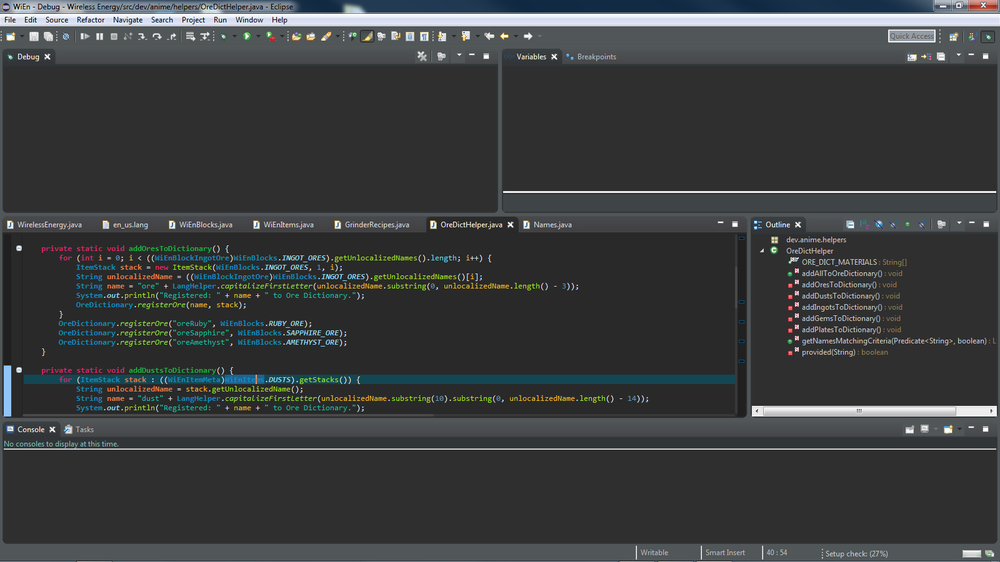
It shouldn't crash the game, it will basically pause it and eclipse should prompt you. Say yes and you should get a debug ui that you can view things with. That looks something like this, though the color shouldn't change.
-
A breakpoint and a break are two different things. Look up how to set a breakpoint in eclipse.
-
Could you show me in a picture?
-
I suggest stepping through your code in the debugger set a breakpoint at the top of getArmorModel.
-
I'm pretty sure it is the fact that your Collar uses ArmorMaterial.LEATHER. Make a custom one and use that instead.
-
This is also very vital.
-
You will need to use a Capabilty and attach it to the player to store the card they are supposed to get. And how is the player opening the gui, right clicking on a block? If so you can get the TileEntity from there and get the initial card.